Hello World as a Tested System

Here is the famous Hello World program in Python.
print("Hello Python world!")It is impressive how many languages this has been written in. See an interesting site here on github that shows over 1000 versions of it.
This can be used as the first step someone might take into learning a programming language. Or it could also be used to run and make sure one's programming environment is working correctly.
It could be run simply like this:
> python hello_world.py
Hello Python world!
Nothing could be simpler. Hardly belongs on a blog site about tackling complexity.
(note, in order to handle the length of some of the code sections, those sections are all individually scrollable and most have tabs)
Perhaps it's interesting to look at this simple program through the lens of tackling complexity. Are we making a mountain out of a molehill? Perhaps. Perhaps not. Let's do it anyway.
A question one could rightfully ask is, "How do I test hello world?". How far down the rabbit hole might this question lead us and what we might learn from it. It is also surprising what we find might apply more broadly to software development, systems development etc.
Is it even worth it to investigate the testing of a "Hello world" program (and its slightly modified variants)? Again, perhaps. Perhaps not. Let's see what's there.
One way to test it is, of course, to run it as above and look at the screen output ourselves like we did above. Or run it in a "test case" and, again, check the screen output (remembering to include the -s command line argument to pytest of course, to prevent pytest from swallowing up the output)
A test case could look like this:
def test_hello_world():
    print("Hello Python world!")
and run with pytest:
%> pytest -s test_hello_world_simple.pyWhich gives us this result:
============= 1 passed in 0.01s =============
% pytest -s test_hello_world_simple.py
============= test session starts =============
platform darwin -- Python 3.12.11, pytest-8.4.1, pluggy-1.6.0
rootdir: ./
configfile: pyproject.toml
plugins: langsmith-0.4.29, cov-6.3.0, anyio-4.10.0, dash-3.2.0, mock-3.14.1
collected 1 item

test_hello_world_simple.py Hello Python world!
.

============== 1 passed in 0.01s ===============
But we aren't really testing it, we're just running it from pytest.
What do we want to test? The output of the print statement.
There are a number of ways to test this programmatically (i.e. without using your eyes to verify the output):
def test_hello_world(mocker):
    mock_print = mocker.patch("builtins.print")
    print("Hello Python world!")
    mock_print.assert_called_once_with("Hello Python world!")
Which can be run with pytest:
============= test session starts =============
platform darwin -- Python 3.12.11, pytest-8.4.1, pluggy-1.6.0
rootdir: ./
configfile: pyproject.toml
plugins: langsmith-0.4.29, cov-6.3.0, anyio-4.10.0, dash-3.2.0, mock-3.14.1
collected 1 item

test_hello_world.py .                                                    [100%]

========== 1 passed in 0.01s ============
and if there is an error (let's say there is a missing exclamation point)
def test_hello_world(mocker):
    mock_print = mocker.patch("builtins.print")
    print("Hello Python world")
    mock_print.assert_called_once_with("Hello Python world!")
We get an error (note: this and all other entries are vertically and horizontally scrollable and some have tabs in them for multiple related listings and outputs):
=================================== FAILURES ===================================
_______________________________ test_hello_world _______________________________

self = <MagicMock name='print' id='4400075728'>, args = ('Hello Python world!',)
kwargs = {}, expected = call('Hello Python world!')
actual = call('Hello Python world')
_error_message = <function NonCallableMock.assert_called_with.<locals>._error_message at 0x106460ae0>
cause = None

    def assert_called_with(self, /, *args, **kwargs):
        """assert that the last call was made with the specified arguments.

        Raises an AssertionError if the args and keyword args passed in are
        different to the last call to the mock."""
        if self.call_args is None:
            expected = self._format_mock_call_signature(args, kwargs)
            actual = 'not called.'
            error_message = ('expected call not found.\nExpected: %s\n  Actual: %s'
                    % (expected, actual))
            raise AssertionError(error_message)

        def _error_message():
            msg = self._format_mock_failure_message(args, kwargs)
            return msg
        expected = self._call_matcher(_Call((args, kwargs), two=True))
        actual = self._call_matcher(self.call_args)
        if actual != expected:
            cause = expected if isinstance(expected, Exception) else None
>           raise AssertionError(_error_message()) from cause
E           AssertionError: expected call not found.
E           Expected: print('Hello Python world!')
E             Actual: print('Hello Python world')

/opt/homebrew/Cellar/python@3.12/3.12.11/Frameworks/Python.framework/Versions/3.12/lib/python3.12/unittest/mock.py:949: AssertionError

During handling of the above exception, another exception occurred:

self = <MagicMock name='print' id='4400075728'>, args = ('Hello Python world!',)
kwargs = {}

    def assert_called_once_with(self, /, *args, **kwargs):
        """assert that the mock was called exactly once and that that call was
        with the specified arguments."""
        if not self.call_count == 1:
            msg = ("Expected '%s' to be called once. Called %s times.%s"
                   % (self._mock_name or 'mock',
                      self.call_count,
                      self._calls_repr()))
            raise AssertionError(msg)
>       return self.assert_called_with(*args, **kwargs)
               ^^^^^^^^^^^^^^^^^^^^^^^^^^^^^^^^^^^^^^^^
E       AssertionError: expected call not found.
E       Expected: print('Hello Python world!')
E         Actual: print('Hello Python world')
E
E       pytest introspection follows:
E
E       Args:
E       assert ('Hello Python world',) == ('Hello Python world!',)
E
E         At index 0 diff: 'Hello Python world' != 'Hello Python world!'
E         Use -v to get more diff

/opt/homebrew/Cellar/python@3.12/3.12.11/Frameworks/Python.framework/Versions/3.12/lib/python3.12/unittest/mock.py:961: AssertionError

During handling of the above exception, another exception occurred:

mocker = <pytest_mock.plugin.MockerFixture object at 0x10643e840>

    def test_hello_world(mocker):
        mock_print = mocker.patch("builtins.print")
        print("Hello Python world")
>       mock_print.assert_called_once_with("Hello Python world!")
E       AssertionError: expected call not found.
E       Expected: print('Hello Python world!')
E         Actual: print('Hello Python world')
E
E       pytest introspection follows:
E
E       Args:
E       assert ('Hello Python world',) == ('Hello Python world!',)
E
E         At index 0 diff: 'Hello Python world' != 'Hello Python world!'
E         Use -v to get more diff

test_hello_world.py:4: AssertionError
=========================== short test summary info ============================
FAILED test_hello_world.py::test_hello_world - AssertionError: expected call not found.
============================== 1 failed in 0.09s ===============================
Pretty noisy output. Really all you need to see are the following lines from the error message:
E       Expected: print('Hello Python world!')
E         Actual: print('Hello Python world')
We can also run tests from a bash shell (using Bash Automated Test System, BATS) which might be considered to be an integration, end-to-end, or even a user acceptance test. Most of the remaining code segments have tabs to show the different aspects such as:
content1content2content3# hello.py - The program to test
def hello_world():
print("Hello Python world!")
if __name__ == "__main__":
hello_world()# test_hello.bats
#!/usr/bin/env bats
@test "hello.py prints correct message" {
run python hello.py
[ "$status" -eq 0 ]
[ "$output" = "Hello Python world!" ]
}bats test.bats
test.bats
✓ hello.py prints correct message
1 test, 0 failures
Let's modify the hello world program in a few small ways:
- create a function and move the print statement there
- add a parameter to the function so we can change the greeting beginning ("Hello", "Hallo", etc.)
- add a return statement letting us know all went well in the function
def greet(hello):
    print(f"{hello} Python world!")
    return True
Add function with an input (hello parameter) and an output (return statement)
Next we can change the test.
def test_hello_world():
    assert greet('Hello')
And this test passes. But we still here haven't verified the output.
Let's make another change to accept user input so it says the greeting with the particular user's name.
def greet(hello):
    name = input("Please enter your name: ")
    print(f"{hello} {name}!")
    return True

greet("Hello")
% python hello_direct_input.py
Please enter your name: Dave
Hello Dave!
%
a test case could look like:
def test_hello_world():
    assert greet('Hello')
===========test session starts ==========
platform darwin -- Python 3.12.11, pytest-8.4.1, pluggy-1.6.0
rootdir: ./
configfile: pyproject.toml
plugins: langsmith-0.4.29, cov-6.3.0, anyio-4.10.0, dash-3.2.0, mock-3.14.1
collected 1 item
test_hello_world_simple3.py Please enter your name: Dave
Hello Dave!
============= 1 passed in 4.14s ============
% The test hangs/blocks when the program prompts the user: Please enter your name:.
Let's look at this function again from a slightly different perspective. Here is the function again.
def greet(hello):
    name = input("Please enter your name: ")
    print(f"{hello} {name}!")
    return True
We could view this function in terms of inputs and outputs. It has two inputs:
- The hello parameter
- The user-entered name
It has two outputs
- Greeting message that goes to the screen
- The return value of the function
We could further differentiate these in terms of how easy they are to control/verify. We can list these inputs/outputs as either direct or indirect. Direct implies we can control it or easily gain access to it to verify it. Indirect would imply that this control or access is not as directly accomplished.
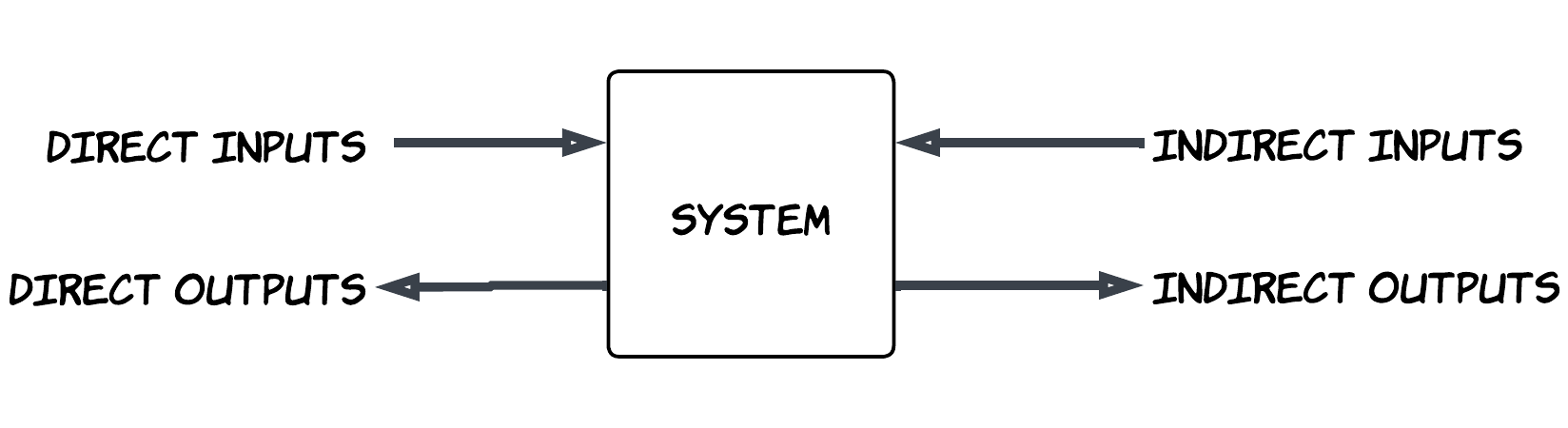
Two inputs:
- The hello parameter (direct)
- The user-entered name (indirect)
Two outputs:
- Greeting message that goes to the screen (indirect)
- The return value of the function (direct)
We can revisit the question we asked earlier: "How do I test this program?"
When we ran our test case, we controlled the greeting beginning word ("Hello") and verified the return value of the function (True). We had to deal with the indirect input and indirect output (i.e. enter our name via the keyboard and look at the screen to make sure the proper message came out). When we run our test case it even blocks on the input part and waits for us to enter the name.
Perhaps there is a different way to handle this where we can take control of all the inputs and outputs and use them in our test case. What if we did something like this:
def test_patch_multiple_functions(mocker):
    mock_print = mocker.patch('builtins.print')
    mock_input = mocker.patch('builtins.input', return_value="Dave")

    assert greet("Hello")

    mock_input.assert_called_once_with("Please enter your name: ")
    mock_print.assert_called_once_with("Hello Dave!")
=========== 1 passed in 0.01s ==============
% pytest -s test_hello_world_simple3.py
============================= test session starts ==============================
platform darwin -- Python 3.12.11, pytest-8.4.1, pluggy-1.6.0
rootdir: ./
configfile: pyproject.toml
plugins: langsmith-0.4.29, cov-6.3.0, anyio-4.10.0, dash-3.2.0, mock-3.14.1
collected 1 item
test_hello_world_simple3.py .
=============== 1 passed in 0.01s ==============
% This certainly seems to follow the tried-and-true Arrange-Act-Assert and Given-When-Then patterns.
Right off the bat, it is easier to run in that the program does not block/hang, waiting for a real user's input. But further it does not require us to view the screen output to verify the program worked. All of these are done in the test cases. In the context of the types of inputs and outputs, we can have control over all direct and indirect inputs and can assert and verify the direct and indirect outputs.
We are using the mocking capabilities of pytest in this case. This is not the only way to do it but it works well for our purposes.
As is the case with so many software solutions, there are many ways to do the same thing. Courtesy of Claude.ai, here are 10 different ways to automatically capture the output of a print statement from within a python test case.
# ===== METHOD 1: Using pytest's capsys fixture =====
def test_with_capsys(capsys):
    """Test using pytest's capsys fixture to capture stdout"""
    hello_world()
    captured = capsys.readouterr()
    assert captured.out == "Hello Python world!\n"
    assert captured.err == ""
# ===== METHOD 2: Using unittest.mock to patch print =====
def test_with_mock_print():
"""Test by mocking the print function itself"""
with patch('builtins.print') as mock_print:
hello_world()
mock_print.assert_called_once_with("Hello Python world!")# ===== METHOD 3: Using unittest.mock to patch sys.stdout =====
def test_with_mock_stdout():
"""Test by mocking sys.stdout"""
mock_stdout = MagicMock()
with patch('sys.stdout', mock_stdout):
hello_world()
mock_stdout.write.assert_any_call("Hello Python world!")# ===== METHOD 4: Using subprocess to run as separate process =====
def test_with_subprocess():
"""Test by running the script as a subprocess"""
result = subprocess.run(
[sys.executable, '-c', 'print("Hello Python world!")'],
capture_output=True,
text=True
)
assert result.stdout == "Hello Python world!\n"
assert result.returncode == 0
def test_with_subprocess_file():
"""Test by running the actual hello.py file as subprocess"""
result = subprocess.run(
[sys.executable, 'hello.py'],
capture_output=True,
text=True
)
assert result.stdout == "Hello Python world!\n"
assert result.returncode == 0# ===== METHOD 5: Using contextlib.redirect_stdout =====
def test_with_redirect_stdout():
"""Test using contextlib to redirect stdout to StringIO"""
f = io.StringIO()
with redirect_stdout(f):
hello_world()
output = f.getvalue()
assert output == "Hello Python world!\n"# ===== METHOD 6: Manually replacing sys.stdout =====
def test_with_stringio():
"""Test by manually replacing sys.stdout with StringIO"""
old_stdout = sys.stdout
sys.stdout = io.StringIO()
try:
hello_world()
output = sys.stdout.getvalue()
assert output == "Hello Python world!\n"
finally:
sys.stdout = old_stdout# ===== METHOD 7: Using pytest's capfd (captures file descriptors) =====
def test_with_capfd(capfd):
"""Test using pytest's capfd fixture (lower level than capsys)"""
hello_world()
captured = capfd.readouterr()
assert captured.out == "Hello Python world!\n"# ===== METHOD 8: Using unittest.TestCase =====
import unittest
class TestHelloWorld(unittest.TestCase):
def test_with_unittest(self):
"""Test using unittest framework with StringIO"""
captured_output = io.StringIO()
sys.stdout = captured_output
try:
hello_world()
self.assertEqual(captured_output.getvalue(), "Hello Python world!\n")
finally:
sys.stdout = sys.__stdout__# ===== METHOD 9: Using doctest =====
def hello_world_with_doctest():
"""
Print hello world message.
This is the awkward way to test print with doctest:
>>> import io, sys
>>> old_stdout = sys.stdout
>>> sys.stdout = io.StringIO()
>>> hello_world_with_doctest()
>>> output = sys.stdout.getvalue()
>>> sys.stdout = old_stdout
>>> output
'Hello Python world!\\n'
"""
print("Hello Python world!")
# ===== METHOD 10: Better doctest approach - test a function that returns =====
def get_hello_message():
    """
    Get hello world message.

    >>> get_hello_message()
    'Hello Python world!'
    """
    return "Hello Python world!"
pytest print_test_methods.py --doctest-modules -v
============================= test session starts ==============================
print_test_methods.py::print_test_methods.add_numbers PASSED [ 8%]
print_test_methods.py::print_test_methods.get_hello_message PASSED [ 16%]
print_test_methods.py::print_test_methods.hello_world_with_doctest PASSED [ 25%]
print_test_methods.py::test_with_capsys PASSED [ 33%]
print_test_methods.py::test_with_mock_print PASSED [ 41%]
print_test_methods.py::test_with_mock_stdout PASSED [ 50%]
print_test_methods.py::test_with_subprocess PASSED [ 58%]
print_test_methods.py::test_with_subprocess_file PASSED [ 66%]
print_test_methods.py::test_with_redirect_stdout PASSED [ 75%]
print_test_methods.py::test_with_stringio PASSED [ 83%]
print_test_methods.py::test_with_capfd PASSED [ 91%]
print_test_methods.py::TestHelloWorld::test_with_unittest PASSED [100%]
============================== 12 passed in 0.08s ==============================
%
Now another question could be:
"What could possibly go wrong?"
... and of course
"How would we test that?"
And finally,
"What are we supposed to do when that 'something(s)' goes wrong and how can we verify that we have done those actions correctly?"
Lot's of questions to ask. These are not the typical questions we ask when creating and running such a simple a "Hello world" program. But we can still ask and the answers are surprisingly applicable and relevant more widely that we may have thought.
More specifically now, we could ask, "Could anything go wrong with the input call?" How about the print call? How would we test these and what do we do in the case that they do not function as we expect?
Most current python implementations that are widely used, contain input and print functions from the builtins module that can raise exceptions.
Here is an example how to cause the print statement to raise a BrokenPipeError:
for i in range(100000):
    # Print a long line to fill buffer faster
    # Eventually the buffer fills up and print() internally flushes
    # That internal flush inside print() raises BrokenPipeError
    print(f"Line {i}: " + "X" * 10000)
% python broken_method2.py | head -n 1
Line 0: XXXXXXXXXXXXXXXXXXXXXXXXXXXXXXXXXXXXXXXXXXXXXXXXXXXXXXXXXXXXXXXXXXXXXXXXXXXX
broken_method2.py", line 6, in
print(f"Line {i}: " + "X" * 10000)
BrokenPipeError: [Errno 32] Broken pipe
Exception ignored in: <_io.TextIOWrapper name='' mode='w' encoding='utf-8'>
BrokenPipeError: [Errno 32] Broken pipe
This program, when run in a particular way (piping it to head -n 1, is capable of making the print function generate a `BrokenPipeError`exception which bubbles up all the way to the user because it is not dealt with in the program.
Here's another. This may seem a bit contrived but yet it is possible and certainly I've seen worse.
import io

# Create a file/stream that only accepts ASCII
ascii_stream = io.TextIOWrapper(
    io.BytesIO(),
    encoding='ascii',
    errors='strict'  # Will raise error on non-ASCII chars
)

print("Hello World 你好 مرحبا", file=ascii_stream)
ascii_stream.flush()
% python test_unicode_error.py
Traceback (most recent call last):
  File "test_unicode_error.py", line 10, in
    print("Hello World 你好 مرحبا", file=ascii_stream)
UnicodeEncodeError: 'ascii' codec can't encode characters in position 12-13: ordinal not in range(128)
%
One could also imagine perhaps the system ran out of memory for some reason (similar to a disk full scenario for a file system write). I have seen this happen in the real world where an entire financial system stopped functioning due to a full disk.
# Uncomment at your own risk:
# try:
#     print("x" * (10**10))  # 10 billion characters
# except MemoryError as e:
#     print(f"Caught MemoryError: {e}")
A memory error is not as easy to induce as the others but may be just as probable or improbable but possible. Even more reason to investigate different ways to induce these exceptions in a way that seems real to the program but not necessarily happening for real. Almost reminds us of the question Morpheus asked in the Matrix movie: "Morpheus: What is real? How do you define 'real'? If you're talking about what you can feel, what you can smell, what you can taste and see, then 'real' is simply electrical signals interpreted by your brain." (ref )
Here's another that causes a ValueError:
import io
file_stream = io.StringIO()
file_stream.close()

print("Hello World", file=file_stream)
% python test_closed_file.py
Traceback (most recent call last):
File "test_closed_file.py", line 5, in
print("Hello World", file=file_stream)
ValueError: I/O operation on closed file
% Some are not exactly applicable to our hello world since the call is our call is made with one string parameter. But it is good to know what sorts of exceptions can be raised in the various uses of the print function. Then again, let's put on the hat of someone who is modifying and evolving the hello world program, perhaps also passing in the file which could be stdout but also could be something else and thus introduce more possibilities and probabilities of exceptions.
I think we made the point regarding possible errors/exceptions that can come from the print call.
What about the input call? What types of exceptions might be raised by that function call?
Here's one.
user_input = input("Enter something: ")% python eof_input.py < /dev/null
Enter something: Traceback (most recent call last):
File "eof_input.py", line 1, in
user_input = input("Enter something: ")
^^^^^^^^^^^^^^^^^^^^^^^^^^
EOFError: EOF when reading a line
% And two others:
#run and use ctrl-C after prompt
user_input = input("Enter something: ")
(\% python eof_input.py
Enter something: ^CTraceback (most recent call last):
File "eof_input.py", line 1, in
user_input = input("Enter something: ")
^^^^^^^^^^^^^^^^^^^^^^^^^^
KeyboardInterrupt
% import sys
sys.stdin.close()
user_input = input("This will fail: ")% python runtime_error_input.py
This will fail: Traceback (most recent call last):
File "runtime_error_input.py", line 4, in
user_input = input("This will fail: ")
^^^^^^^^^^^^^^^^^^^^^^^^^
ValueError: I/O operation on closed file.
% An even two more for theinputfunction:
import os
import sys

original_stdin = sys.stdin

with open('/dev/null', 'w') as f:
    sys.stdin = f
    user_input = input("This should fail: ")
% python os_error_input.py
This should fail: Traceback (most recent call last):
File "/chapter_01/tests/os_error_input.py", line 8, in
user_input = input("This should fail: ")
^^^^^^^^^^^^^^^^^^^^^^^^^^^
io.UnsupportedOperation: not readable
% import sys
import io
original_stdin = sys.stdin
invalid_bytes = b'\xff\xfe'
sys.stdin = io.TextIOWrapper(
io.BytesIO(invalid_bytes + b'\n'),
encoding='utf-8',
errors='strict'
)
user_input = input("This might fail: ")% python decode_error.py
This might fail: Traceback (most recent call last):
File "decode_error.py", line 13, in
user_input = input("This might fail: ")
^^^^^^^^^^^^^^^^^^^^^^^^^^
File "", line 322, in decode
UnicodeDecodeError: 'utf-8' codec can't decode byte 0xff in position 0: invalid start byte
% It is interesting that exceptions can come from how we call it a function, what happens elsewhere in our python program,, how we run it or how it is used (e.g. piping to head 1 for a print program, or taking input from /dev/nullor typing ctrl-C). Some of these can be particularly surprising because you don't always control some of the external aspects but should you should know about how the program could be used and thus make the program behave gracefully in the presence of these circumstances.
Some information could even come from externally provided configuration information perhaps maintained and modified by others and yet processed by our program (perhaps the encoding scheme on input and output streams)
Enough already eh? I think, again, we have made our point with regard to possible exceptions emanating from both input and print and the environment in which the program should behave well.
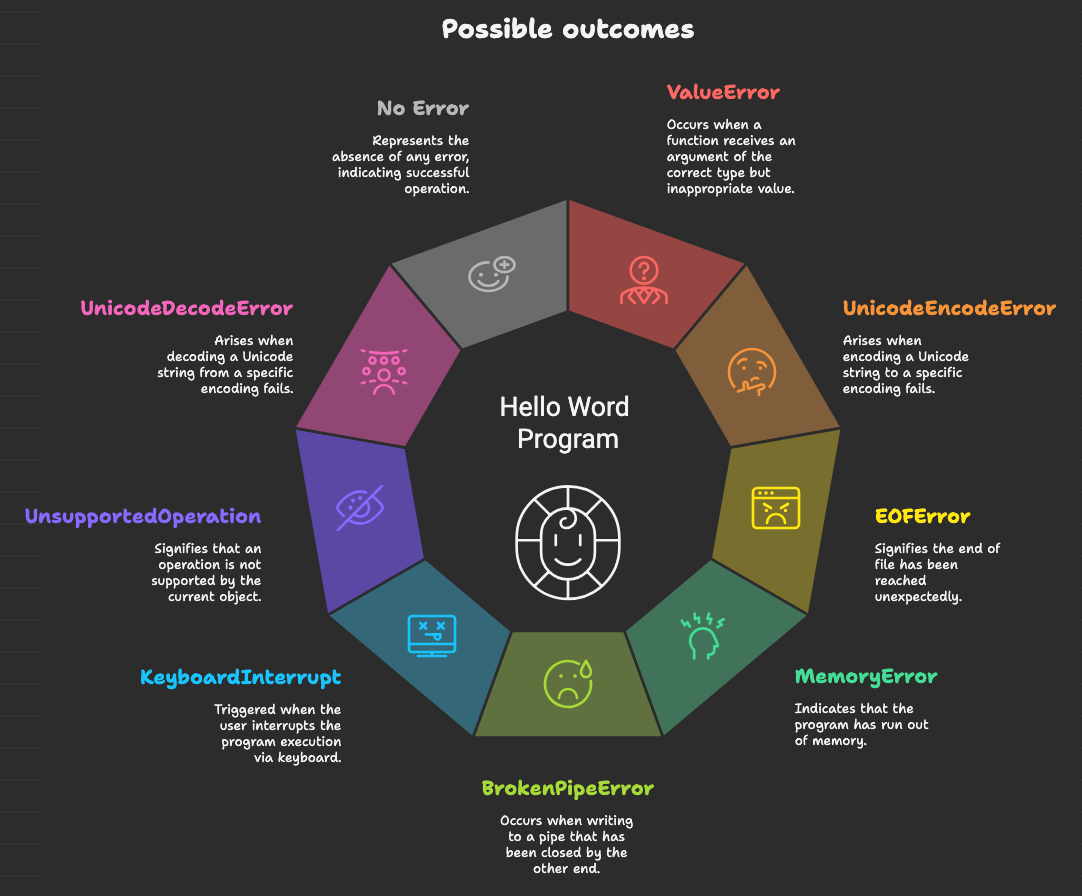
One last point: From the perspective of the greet function, we are mostly concerned that the exception/error condition can occur, not so much how they were induced.
Now that we know, demonstrably, that these errors can occur, we can approach now how to test the hello world program and what to do in the presence of these exceptions and how to verify that we are doing the right thing?
Again, here is the program:
def greet(hello):
    name = input("Please enter your name: ")
    print(f"{hello} {name}!")
    return True
So, how might we test some of these exceptional circumstances. Recall, the way we tested the normal (successful) path through the code was with the following test case.
def test_patch_multiple_functions(mocker):
    mock_print = mocker.patch('builtins.print')
    mock_input = mocker.patch('builtins.input', return_value="Dave")

    assert greet("Hello")

    mock_input.assert_called_once_with("Please enter your name: ")
    mock_print.assert_called_once_with("Hello Dave!")
=========== 1 passed in 0.01s ==============
% pytest -s test_hello_world_simple3.py
============================= test session starts ==============================
platform darwin -- Python 3.12.11, pytest-8.4.1, pluggy-1.6.0
rootdir: ./
configfile: pyproject.toml
plugins: langsmith-0.4.29, cov-6.3.0, anyio-4.10.0, dash-3.2.0, mock-3.14.1
collected 1 item
test_hello_world_simple3.py .
=============== 1 passed in 0.01s ==============
% Not only can these mocks be used to inject data from dependencies and capture outputs into dependencies they can also be used to raise exceptions from dependencies and capture actions and outputs from the error handling code.
def greet(hello):
    name = input("Please enter your name: ")
    print(f"{hello} {name}!")

def test_input_eof_error(mocker):
    """Test EOFError from input (Ctrl+D on Unix, Ctrl+Z on Windows)."""
    mocker.patch('builtins.input', side_effect=EOFError)
    greet("Hello")
% pytest test_eof_input.py
============================= test session starts ==============================
platform darwin -- Python 3.12.11, pytest-8.4.1, pluggy-1.6.0
rootdir: ./
configfile: pyproject.toml
plugins: langsmith-0.4.29, cov-6.3.0, anyio-4.10.0, dash-3.2.0, mock-3.14.1
collected 1 item
test_eof_input.py F [100%]
=================================== FAILURES ===================================
_____________________________ test_input_eof_error _____________________________
mocker =
def test_input_eof_error(mocker):
"""Test EOFError from input (Ctrl+D on Unix, Ctrl+Z on Windows)."""
mocker.patch('builtins.input', side_effect=EOFError)
> greet("Hello")
test_eof_input.py:8:
_ _ _ _ _ _ _ _ _ _ _ _ _ _ _ _ _ _ _ _ _ _ _ _ _ _ _ _ _ _ _ _ _ _ _ _ _ _ _ _
test_eof_input.py:2: in greet
name = input("Please enter your name: ")
^^^^^^^^^^^^^^^^^^^^^^^^^^^^^^^^^
/opt/homebrew/Cellar/python@3.12/3.12.11/Frameworks/Python.framework/Versions/3.12/lib/python3.12/unittest/mock.py:1139: in __call__
return self._mock_call(*args, **kwargs)
^^^^^^^^^^^^^^^^^^^^^^^^^^^^^^^^
/opt/homebrew/Cellar/python@3.12/3.12.11/Frameworks/Python.framework/Versions/3.12/lib/python3.12/unittest/mock.py:1143: in _mock_call
return self._execute_mock_call(*args, **kwargs)
^^^^^^^^^^^^^^^^^^^^^^^^^^^^^^^^^^^^^^^^
_ _ _ _ _ _ _ _ _ _ _ _ _ _ _ _ _ _ _ _ _ _ _ _ _ _ _ _ _ _ _ _ _ _ _ _ _ _ _ _
self =
args = ('Please enter your name: ',), kwargs = {}, effect =
def _execute_mock_call(self, /, *args, **kwargs):
# separate from _increment_mock_call so that awaited functions are
# executed separately from their call, also AsyncMock overrides this method
effect = self.side_effect
if effect is not None:
if _is_exception(effect):
> raise effect
E EOFError
/opt/homebrew/Cellar/python@3.12/3.12.11/Frameworks/Python.framework/Versions/3.12/lib/python3.12/unittest/mock.py:1198: EOFError
=========================== short test summary info ============================
FAILED test_eof_input.py::test_input_eof_error - EOFError
============================== 1 failed in 0.09s ===============================
%
Quite a noisy error results when you run it with pytest but it fails nonetheless with an EOFError coming out from the input call. With little effort we were able simulate an EOFError. Did we really reach the End of File? No, but the program "thinks" we did (i.e. we are in the Matrix). As far as our greet function is concerned it does not know how the EOFError gets caused but the program is aware that it gets raised and it either deals with it or it doesn't. One way or the other, it is easy for us to write this test and it is a valid way to start seeing how the greet function deals with this situation. Another way to look at it is that we are essentially modeling the external dependencies of the hello world central system component.
Just to get this test to pass we can modify the test case slightly and run it again:
import pytest

def greet(hello):
    name = input("Please enter your name: ")
    print(f"{hello} {name}!")

def test_input_eof_error(mocker):
    """Test EOFError from input (Ctrl+D on Unix, Ctrl+Z on Windows)."""
    mocker.patch('builtins.input', side_effect=EOFError)
    with pytest.raises(EOFError):
        greet("Hello")
% pytest test_eof_input_with.py
============================= test session starts ==============================
platform darwin -- Python 3.12.11, pytest-8.4.1, pluggy-1.6.0
rootdir: ./
configfile: pyproject.toml
plugins: langsmith-0.4.29, cov-6.3.0, anyio-4.10.0, dash-3.2.0, mock-3.14.1
collected 1 item
test_eof_input_with.py . [100%]
============================== 1 passed in 0.01s ===============================
% That's great that the test passes but really we are testing that an exception can be raised and bubble up through our entire program. Really what we want to test is that the exception is dealt with in some way (if only just a log message logged and and then return False). Let's catch the exception and log a message to the logger.
import pytest
import logging

def greet(hello):
    try:
        name = input("Please enter your name: ")
    except(EOFError) as e:
        logging.error(f"EOFError {e}")
        return False

    print(f"{hello} {name}!")

def test_greet_eoferror_with_logging(mocker):
    mock_input = mocker.patch("builtins.input",
                              side_effect=EOFError("EOF when reading a line"))
    mock_logger = mocker.patch("logging.error")
    logging.basicConfig(level=logging.ERROR)

    assert greet("Hello") == False
    mock_input.assert_called_once_with("Please enter your name: ")
    mock_logger.assert_called_once_with("EOFError EOF when reading a line")
% pytest -s test_eof_input_with_logging.py
============================= test session starts ==============================
platform darwin -- Python 3.12.11, pytest-8.4.1, pluggy-1.6.0
rootdir: ./
configfile: pyproject.toml
plugins: langsmith-0.4.29, cov-6.3.0, anyio-4.10.0, dash-3.2.0, mock-3.14.1
collected 1 item
test_eof_input_with_logging.py .
============================== 1 passed in 0.01s ===============================
% Of course, this raises the question as to what the user wants to do, do they want to exit by typing ctrl-D? Should we ask them are they sure they want to quit or do we just log it? Now one can decide what to do in this case and verify that it is done (in this case that the logging is performed)
How about for another exception?
def greet(hello):
    try:
        name = input("Please enter your name: ")
    except(EOFError) as e:
        logging.error(f"EOFError {e}")
        return False
    except(KeyboardInterrupt) as e:
        logging.error(f"KeyboardInterrupt {e}")
        return False

    print(f"{hello} {name}!")

def test_greet_keyboardinterrupt_with_logging(mocker):
    mock_input = mocker.patch("builtins.input",
                              side_effect=KeyboardInterrupt("when inputting from keyboard"))
    mock_logger = mocker.patch("logging.error")
    mock_print = mocker.patch("builtins.print")
    logging.basicConfig(level=logging.ERROR)

    assert greet("Hello") == False

    mock_input.assert_called_once_with("Please enter your name: ")
    mock_logger.assert_called_once_with("KeyboardInterrupt when inputting from keyboard")
    mock_print.assert_not_called()
============================== 4 passed in 0.02s ===============================
% pytest -s test_keyboard_input_with_logging.py
============================= test session starts ==============================
platform darwin -- Python 3.12.11, pytest-8.4.1, pluggy-1.6.0
rootdir: ./
configfile: pyproject.toml
plugins: langsmith-0.4.29, cov-6.3.0, anyio-4.10.0, dash-3.2.0, mock-3.14.1
collected 1 item
test_keyboard_input_with_logging.py .
============================== 1 passed in 0.02s ===============================
%
One has to decide if something different needs to be done in the presence of each exception. In this case we are just logging but we certainly could test if there was different exception handling code for each case.
We can do something similar with the print function call.
Let's fast forward to the whole enchilada. Just for fun, let's push it to the limit. So we have two limits. Doing nothing and doing everything very specifically. And then perhaps there is a middle, more practical, ground. We look at tall three.
So the extreme case:
import logging
import sys
import io

# Configure logging
logging.basicConfig(
    level=logging.INFO,
    format='%(asctime)s - %(levelname)s - %(message)s',
    handlers=[
        logging.FileHandler('greet.log'),
        logging.StreamHandler(sys.stdout)
    ]
)

def greet(hello):
    """
    Greet a user with comprehensive exception handling and logging.

    Args:
        hello: Greeting message to display
    """
    logger = logging.getLogger(__name__)

    try:
        # Validate the hello parameter
        if not isinstance(hello, str):
            logger.error(f"Invalid greeting type: {type(hello).__name__}. Expected string.")
            hello = str(hello)
            logger.info(f"Converted greeting to string: {hello}")

        if not hello.strip():
            logger.warning("Empty greeting provided, using default.")
            hello = "Hello"

        logger.info("Prompting user for name input")

        # Handle input() exceptions
        try:
            name = input("Please enter your name: ")
            logger.info(f"User input received: {name}")

            # Validate name input
            if not name.strip():
                logger.warning("Empty name entered")
                name = "Guest"

        except EOFError:
            logger.error("EOFError: Input stream closed unexpectedly")
            name = "Guest"
            print("\nNo input detected. Using default name.")

        except KeyboardInterrupt:
            logger.warning("KeyboardInterrupt: User cancelled input")
            print("\n\nInput cancelled by user.")
            sys.exit(0)

        except UnicodeDecodeError as e:
            logger.error(f"UnicodeDecodeError: Cannot decode input - {e}")
            name = "Guest"
            print(f"\nInvalid character encoding in input. Using default name.")

        except RuntimeError as e:
            logger.error(f"RuntimeError during input: {e}")
            # Can occur if input() is called in threads or when stdin is being modified
            name = "Guest"
            print(f"\nRuntime error reading input. Using default name.")

        except OSError as e:
            logger.error(f"OSError during input: {e}")
            # File descriptor issues, closed stdin, etc.
            name = "Guest"
            print(f"\nSystem error reading input. Using default name.")

        except ValueError as e:
            logger.error(f"ValueError during input: {e}")
            # Rare but can occur with stdin issues
            name = "Guest"
            print(f"\nInvalid input format. Using default name.")

        except Exception as e:
            logger.error(f"Unexpected error during input: {type(e).__name__} - {e}")
            name = "Guest"
            print(f"\nError reading input: {e}. Using default name.")

        # Handle print() exceptions
        try:
            greeting_message = f"{hello} {name}!"
            print(greeting_message)
            logger.info(f"Successfully displayed greeting: {greeting_message}")

        except UnicodeEncodeError as e:
            logger.error(f"UnicodeEncodeError during print: {e}")
            # Terminal can't encode certain characters
            safe_message = greeting_message.encode('ascii', 'replace').decode('ascii')
            print(safe_message)
            logger.info("Displayed greeting with ASCII fallback")

        except UnicodeDecodeError as e:
            logger.error(f"UnicodeDecodeError during print: {e}")
            # Rare but can occur with stdout encoding issues
            try:
                print(greeting_message.encode('utf-8', 'replace').decode('utf-8'))
                logger.info("Displayed greeting with UTF-8 fallback")
            except:
                logger.error("Could not print with any encoding")

        except OSError as e:
            logger.error(f"OSError during print: {e}")
            # Output stream closed, broken pipe (SIGPIPE), disk full, etc.
            logger.info(f"Could not print greeting: {greeting_message}")

        except BrokenPipeError as e:
            logger.error(f"BrokenPipeError during print: {e}")
            # Occurs when output is piped to a command that terminates early
            logger.info(f"Output pipe broken, could not complete print: {greeting_message}")

        except IOError as e:
            logger.error(f"IOError during print: {e}")
            # General I/O errors with stdout
            logger.info(f"I/O error prevented printing: {greeting_message}")

        except ValueError as e:
            logger.error(f"ValueError during print: {e}")
            # Can occur if sys.stdout is closed
            logger.info(f"Invalid output stream state: {greeting_message}")

        except AttributeError as e:
            logger.error(f"AttributeError during print: {e}")
            # sys.stdout might be None or missing write method
            logger.info(f"Output stream unavailable: {greeting_message}")

        except MemoryError as e:
            logger.error(f"MemoryError during print: {e}")
            # Extremely large strings (unlikely here but possible)
            try:
                print(f"{hello} {name[:50]}!")  # Truncate name
                logger.warning("Printed truncated greeting due to memory constraints")
            except:
                logger.critical("Could not print even truncated message")

        except RecursionError as e:
            logger.error(f"RecursionError during print: {e}")
            # Can occur if custom stdout has recursive __str__ or __repr__
            logger.info(f"Recursion error prevented printing: {greeting_message}")

        except Exception as e:
            logger.error(f"Unexpected error during print: {type(e).__name__} - {e}")
            logger.info(f"Attempted to print: {greeting_message}")

    except Exception as e:
        logger.critical(f"Critical error in greet function: {type(e).__name__} - {e}", exc_info=True)
        try:
            print("An unexpected error occurred. Please check the logs.")
        except:
            logger.critical("Could not print error message to user")


if __name__ == "__main__":
    try:
        greet("Hello")
    except Exception as e:
        logging.critical(f"Fatal error in main: {e}", exc_info=True)
        sys.exit(1)
And, get ready for it, an extreme test case also courtesy of Claude.ai, weighing in at over 700 lines of code:
import pytest
import sys
from unittest.mock import Mock, patch, MagicMock, call
from io import StringIO

# Import the greet function (assuming it's in greet.py)
# from greet import greet
from greet_full_error_handling_logging import greet

class CustomCriticalError(Exception):
    """Custom exception to test critical error paths."""
    pass

class TestGreetFunction:
    """Test suite for the greet function with comprehensive exception handling."""

    @pytest.fixture
    def mock_logger(self, mocker):
        """Fixture to mock the logger."""
        return mocker.patch('logging.getLogger')

    # ===== SUCCESS CASES =====

    def test_greet_normal_success(self, mocker, mock_logger):
        """Test normal successful greeting."""
        mock_input = mocker.patch('builtins.input', return_value='Alice')
        mock_print = mocker.patch('builtins.print')
        logger_instance = mock_logger.return_value

        greet("Hello")

        mock_input.assert_called_once_with("Please enter your name: ")
        mock_print.assert_called_once_with("Hello Alice!")
        logger_instance.info.assert_any_call("Prompting user for name input")
        logger_instance.info.assert_any_call("User input received: Alice")
        logger_instance.info.assert_any_call("Successfully displayed greeting: Hello Alice!")

    def test_greet_empty_name_input(self, mocker, mock_logger):
        """Test handling of empty name input."""
        mock_input = mocker.patch('builtins.input', return_value='   ')
        mock_print = mocker.patch('builtins.print')
        logger_instance = mock_logger.return_value

        greet("Hi")

        mock_input.assert_called_once_with("Please enter your name: ")
        mock_print.assert_called_once_with("Hi Guest!")
        logger_instance.warning.assert_called_with("Empty name entered")

    def test_greet_with_non_string_hello(self, mocker, mock_logger):
        """Test greeting parameter type conversion."""
        mock_input = mocker.patch('builtins.input', return_value='Bob')
        mock_print = mocker.patch('builtins.print')
        logger_instance = mock_logger.return_value

        greet(123)

        mock_input.assert_called_once_with("Please enter your name: ")
        mock_print.assert_called_once_with("123 Bob!")
        logger_instance.error.assert_called_with("Invalid greeting type: int. Expected string.")
        logger_instance.info.assert_any_call("Converted greeting to string: 123")

    def test_greet_with_empty_hello(self, mocker, mock_logger):
        """Test empty greeting parameter."""
        mock_input = mocker.patch('builtins.input', return_value='Charlie')
        mock_print = mocker.patch('builtins.print')
        logger_instance = mock_logger.return_value

        greet("   ")

        mock_input.assert_called_once_with("Please enter your name: ")
        mock_print.assert_called_once_with("Hello Charlie!")
        logger_instance.warning.assert_called_with("Empty greeting provided, using default.")

    # ===== INPUT EXCEPTION CASES =====

    def test_greet_input_eoferror(self, mocker, mock_logger):
        """Test EOFError during input - greeting still printed with Guest."""
        mock_input = mocker.patch('builtins.input', side_effect=EOFError())
        mock_print = mocker.patch('builtins.print')
        logger_instance = mock_logger.return_value

        greet("Hello")

        # Input is still attempted
        mock_input.assert_called_once_with("Please enter your name: ")

        # Print is called twice: error message + greeting
        logger_instance.error.assert_any_call("EOFError: Input stream closed unexpectedly")
        assert mock_print.call_count == 2
        mock_print.assert_any_call("\nNo input detected. Using default name.")
        mock_print.assert_any_call("Hello Guest!")

    def test_greet_input_keyboard_interrupt(self, mocker, mock_logger):
        """Test KeyboardInterrupt during input - no greeting printed, exits."""
        mock_input = mocker.patch('builtins.input', side_effect=KeyboardInterrupt())
        mock_print = mocker.patch('builtins.print')

        # Mock sys.exit to raise SystemExit so we can catch it
        def exit_side_effect(code):
            raise SystemExit(code)

        mock_exit = mocker.patch('sys.exit', side_effect=exit_side_effect)
        logger_instance = mock_logger.return_value

        # KeyboardInterrupt causes sys.exit which raises SystemExit
        # The outer exception handler catches this
        with pytest.raises(SystemExit) as exc_info:
            greet("Hello")

        # Verify it was attempting to exit with 0
        assert exc_info.value.code == 0

        # Input is still attempted
        mock_input.assert_called_once_with("Please enter your name: ")

        # Cancellation message is printed
        logger_instance.warning.assert_called_with("KeyboardInterrupt: User cancelled input")
        mock_print.assert_any_call("\n\nInput cancelled by user.")
        mock_exit.assert_called_once_with(0)

    def test_greet_input_unicode_decode_error(self, mocker, mock_logger):
        """Test UnicodeDecodeError during input - greeting still printed with Guest."""
        mock_input = mocker.patch('builtins.input',
                                  side_effect=UnicodeDecodeError('utf-8', b'\x80', 0, 1, 'invalid'))
        mock_print = mocker.patch('builtins.print')
        logger_instance = mock_logger.return_value

        greet("Hello")

        # Input is still attempted
        mock_input.assert_called_once_with("Please enter your name: ")

        # Print is called twice: error message + greeting
        assert any('UnicodeDecodeError' in str(call) for call in logger_instance.error.call_args_list)
        assert mock_print.call_count == 2
        mock_print.assert_any_call("\nInvalid character encoding in input. Using default name.")
        mock_print.assert_any_call("Hello Guest!")

    def test_greet_input_runtime_error(self, mocker, mock_logger):
        """Test RuntimeError during input - greeting still printed with Guest."""
        mock_input = mocker.patch('builtins.input', side_effect=RuntimeError("Input error"))
        mock_print = mocker.patch('builtins.print')
        logger_instance = mock_logger.return_value

        greet("Hello")

        # Input is still attempted
        mock_input.assert_called_once_with("Please enter your name: ")

        # Print is called twice: error message + greeting
        logger_instance.error.assert_any_call("RuntimeError during input: Input error")
        assert mock_print.call_count == 2
        mock_print.assert_any_call("\nRuntime error reading input. Using default name.")
        mock_print.assert_any_call("Hello Guest!")

    def test_greet_input_os_error(self, mocker, mock_logger):
        """Test OSError during input - greeting still printed with Guest."""
        mock_input = mocker.patch('builtins.input', side_effect=OSError("File descriptor error"))
        mock_print = mocker.patch('builtins.print')
        logger_instance = mock_logger.return_value

        greet("Hello")

        # Input is still attempted
        mock_input.assert_called_once_with("Please enter your name: ")

        # Print is called twice: error message + greeting
        logger_instance.error.assert_any_call("OSError during input: File descriptor error")
        assert mock_print.call_count == 2
        mock_print.assert_any_call("\nSystem error reading input. Using default name.")
        mock_print.assert_any_call("Hello Guest!")

    def test_greet_input_value_error(self, mocker, mock_logger):
        """Test ValueError during input - greeting still printed with Guest."""
        mock_input = mocker.patch('builtins.input', side_effect=ValueError("Invalid value"))
        mock_print = mocker.patch('builtins.print')
        logger_instance = mock_logger.return_value

        greet("Hello")

        # Input is still attempted
        mock_input.assert_called_once_with("Please enter your name: ")

        # Print is called twice: error message + greeting
        logger_instance.error.assert_any_call("ValueError during input: Invalid value")
        assert mock_print.call_count == 2
        mock_print.assert_any_call("\nInvalid input format. Using default name.")
        mock_print.assert_any_call("Hello Guest!")

    def test_greet_input_unexpected_exception(self, mocker, mock_logger):
        """Test unexpected exception during input - greeting still printed with Guest."""
        mock_input = mocker.patch('builtins.input', side_effect=Exception("Unexpected error"))
        mock_print = mocker.patch('builtins.print')
        logger_instance = mock_logger.return_value

        greet("Hello")

        # Input is still attempted
        mock_input.assert_called_once_with("Please enter your name: ")

        # Print is called twice: error message + greeting
        assert any('Unexpected error during input' in str(call)
                   for call in logger_instance.error.call_args_list)
        assert mock_print.call_count == 2
        mock_print.assert_any_call("Hello Guest!")

    # ===== PRINT EXCEPTION CASES =====

    def test_greet_print_unicode_encode_error(self, mocker, mock_logger):
        """Test UnicodeEncodeError during print."""
        mock_input = mocker.patch('builtins.input', return_value='José')
        mock_print = mocker.patch('builtins.print')
        mock_print.side_effect = [
            UnicodeEncodeError('ascii', 'José', 0, 1, 'ordinal not in range'),
            None  # Second call succeeds (fallback)
        ]
        logger_instance = mock_logger.return_value

        greet("Hello")

        # Input is still attempted
        mock_input.assert_called_once_with("Please enter your name: ")

        # Print is attempted twice (original + fallback)
        logger_instance.error.assert_any_call(
            mocker.ANY  # Match any UnicodeEncodeError message
        )
        logger_instance.info.assert_any_call("Displayed greeting with ASCII fallback")
        assert mock_print.call_count == 2

    def test_greet_print_unicode_decode_error(self, mocker, mock_logger):
        """Test UnicodeDecodeError during print."""
        mock_input = mocker.patch('builtins.input', return_value='Dave')
        mock_print = mocker.patch('builtins.print')
        mock_print.side_effect = [
            UnicodeDecodeError('utf-8', b'\x80', 0, 1, 'invalid'),
            None  # Second call succeeds (fallback)
        ]
        logger_instance = mock_logger.return_value

        greet("Hello")

        # Input is still attempted
        mock_input.assert_called_once_with("Please enter your name: ")

        # Print is attempted twice (original + fallback)
        assert any('UnicodeDecodeError during print' in str(call)
                   for call in logger_instance.error.call_args_list)
        logger_instance.info.assert_any_call("Displayed greeting with UTF-8 fallback")
        assert mock_print.call_count == 2

    def test_greet_print_os_error(self, mocker, mock_logger):
        """Test OSError during print - greeting not displayed but logged."""
        mock_input = mocker.patch('builtins.input', return_value='Eve')
        mock_print = mocker.patch('builtins.print', side_effect=OSError("Output error"))
        logger_instance = mock_logger.return_value

        greet("Hello")

        # Input is still attempted
        mock_input.assert_called_once_with("Please enter your name: ")

        # Print is attempted once but fails
        mock_print.assert_called_once_with("Hello Eve!")
        logger_instance.error.assert_any_call("OSError during print: Output error")
        logger_instance.info.assert_any_call("Could not print greeting: Hello Eve!")

    def test_greet_print_broken_pipe_error(self, mocker, mock_logger):
        """Test BrokenPipeError during print - caught as OSError since it's a subclass."""
        mock_input = mocker.patch('builtins.input', return_value='Frank')
        mock_print = mocker.patch('builtins.print', side_effect=BrokenPipeError("Pipe broken"))
        logger_instance = mock_logger.return_value

        greet("Hello")

        # Input is still attempted
        mock_input.assert_called_once_with("Please enter your name: ")

        # Print is attempted once but fails
        mock_print.assert_called_once_with("Hello Frank!")
        # BrokenPipeError is caught by OSError handler (it's a subclass)
        # So we check for OSError in the log, not BrokenPipeError
        error_calls = [str(call) for call in logger_instance.error.call_args_list]
        assert any("OSError during print" in call or "BrokenPipeError during print" in call
                   for call in error_calls)

    def test_greet_print_io_error(self, mocker, mock_logger):
        """Test IOError during print - caught as OSError since IOError is an alias."""
        mock_input = mocker.patch('builtins.input', return_value='Grace')
        mock_print = mocker.patch('builtins.print', side_effect=IOError("I/O error"))
        logger_instance = mock_logger.return_value

        greet("Hello")

        # Input is still attempted
        mock_input.assert_called_once_with("Please enter your name: ")

        # Print is attempted once but fails
        mock_print.assert_called_once_with("Hello Grace!")
        # IOError is essentially OSError in Python 3
        error_calls = [str(call) for call in logger_instance.error.call_args_list]
        assert any("OSError during print" in call or "IOError during print" in call
                   for call in error_calls)

    def test_greet_print_value_error(self, mocker, mock_logger):
        """Test ValueError during print - greeting not displayed but logged."""
        mock_input = mocker.patch('builtins.input', return_value='Henry')
        mock_print = mocker.patch('builtins.print', side_effect=ValueError("Invalid output"))
        logger_instance = mock_logger.return_value

        greet("Hello")

        # Input is still attempted
        mock_input.assert_called_once_with("Please enter your name: ")

        # Print is attempted once but fails
        mock_print.assert_called_once_with("Hello Henry!")
        logger_instance.error.assert_any_call("ValueError during print: Invalid output")
        logger_instance.info.assert_any_call("Invalid output stream state: Hello Henry!")

    def test_greet_print_attribute_error(self, mocker, mock_logger):
        """Test AttributeError during print - greeting not displayed but logged."""
        mock_input = mocker.patch('builtins.input', return_value='Iris')
        mock_print = mocker.patch('builtins.print', side_effect=AttributeError("No write method"))
        logger_instance = mock_logger.return_value

        greet("Hello")

        # Input is still attempted
        mock_input.assert_called_once_with("Please enter your name: ")

        # Print is attempted once but fails
        mock_print.assert_called_once_with("Hello Iris!")
        logger_instance.error.assert_any_call("AttributeError during print: No write method")
        logger_instance.info.assert_any_call("Output stream unavailable: Hello Iris!")

    def test_greet_print_memory_error(self, mocker, mock_logger):
        """Test MemoryError during print with successful truncation."""
        mock_input = mocker.patch('builtins.input', return_value='Jack')
        mock_print = mocker.patch('builtins.print')
        mock_print.side_effect = [
            MemoryError("Out of memory"),
            None  # Second call succeeds (truncated)
        ]
        logger_instance = mock_logger.return_value

        greet("Hello")

        # Input is still attempted
        mock_input.assert_called_once_with("Please enter your name: ")

        # Print is attempted twice (original + truncated fallback)
        logger_instance.error.assert_any_call("MemoryError during print: Out of memory")
        logger_instance.warning.assert_any_call(
            "Printed truncated greeting due to memory constraints"
        )
        assert mock_print.call_count == 2

    def test_greet_print_memory_error_complete_failure(self, mocker, mock_logger):
        """Test MemoryError during print with complete failure."""
        mock_input = mocker.patch('builtins.input', return_value='Kate')
        mock_print = mocker.patch('builtins.print', side_effect=MemoryError("Out of memory"))
        logger_instance = mock_logger.return_value

        greet("Hello")

        # Input is still attempted
        mock_input.assert_called_once_with("Please enter your name: ")

        # Print is attempted twice (original + truncated), both fail
        assert mock_print.call_count == 2
        logger_instance.error.assert_any_call("MemoryError during print: Out of memory")
        logger_instance.critical.assert_any_call("Could not print even truncated message")

    def test_greet_print_recursion_error(self, mocker, mock_logger):
        """Test RecursionError during print - greeting not displayed but logged."""
        mock_input = mocker.patch('builtins.input', return_value='Liam')
        mock_print = mocker.patch('builtins.print', side_effect=RecursionError("Max recursion"))
        logger_instance = mock_logger.return_value

        greet("Hello")

        # Input is still attempted
        mock_input.assert_called_once_with("Please enter your name: ")

        # Print is attempted once but fails
        mock_print.assert_called_once_with("Hello Liam!")
        logger_instance.error.assert_any_call("RecursionError during print: Max recursion")
        logger_instance.info.assert_any_call("Recursion error prevented printing: Hello Liam!")

    def test_greet_print_unexpected_exception(self, mocker, mock_logger):
        """Test unexpected exception during print - greeting not displayed but logged."""
        mock_input = mocker.patch('builtins.input', return_value='Mia')
        mock_print = mocker.patch('builtins.print', side_effect=Exception("Unknown error"))
        logger_instance = mock_logger.return_value

        greet("Hello")

        # Input is still attempted
        mock_input.assert_called_once_with("Please enter your name: ")

        # Print is attempted once but fails
        mock_print.assert_called_once_with("Hello Mia!")
        assert any('Unexpected error during print' in str(call)
                   for call in logger_instance.error.call_args_list)
        logger_instance.info.assert_any_call("Attempted to print: Hello Mia!")

    # ===== CRITICAL ERROR CASES =====

    def test_greet_critical_outer_exception(self, mocker, mock_logger):
        """Test critical exception in outer try block."""
        mock_input = mocker.patch('builtins.input', return_value='Test')
        mock_print = mocker.patch('builtins.print')
        logger_instance = mock_logger.return_value

        # Make the first logger.info call raise a critical error
        # This happens early enough to be caught by the outer handler
        logger_instance.info.side_effect = [
            CustomCriticalError("Critical failure in logging"),
            None,
            None
        ]

        greet("Hello")

        # Verify critical error was logged
        critical_calls = [str(call) for call in logger_instance.critical.call_args_list]
        assert len(critical_calls) > 0, "Expected critical error to be logged"
        assert any('Critical error in greet function' in str(call)
                   for call in critical_calls)

        # Verify error message was printed to user
        print_calls = [str(call) for call in mock_print.call_args_list]
        assert any("An unexpected error occurred" in str(call)
                   for call in print_calls)

    def test_greet_critical_error_print_fails(self, mocker, mock_logger):
        """Test critical error where even error message print fails."""
        mock_input = mocker.patch('builtins.input', return_value='Test')
        mock_print = mocker.patch('builtins.print', side_effect=OSError("Print failed"))
        logger_instance = mock_logger.return_value

        # Make logger raise a critical error
        logger_instance.info.side_effect = CustomCriticalError("Critical failure")

        greet("Hello")

        # Verify both critical errors were logged
        critical_calls = [str(call) for call in logger_instance.critical.call_args_list]
        assert len(critical_calls) >= 1, "Expected critical errors to be logged"

        # Should log about the critical error and optionally about print failure
        assert any('Critical error in greet function' in str(call)
                   for call in critical_calls)

        # Verify print was attempted
        assert mock_print.call_count >= 1

    def test_greet_exception_during_greeting_construction(self, mocker, mock_logger):
        """Test exception during f-string formatting of greeting."""
        mock_input = mocker.patch('builtins.input')
        mock_print = mocker.patch('builtins.print')
        logger_instance = mock_logger.return_value

        # Make input return an object that has strip() but fails during __str__
        class BadStringObject:
            def strip(self):
                return self  # Pass the strip check

            def __str__(self):
                raise CustomCriticalError("String conversion failed")

            def __bool__(self):
                return True  # Ensure it's not treated as empty

        mock_input.return_value = BadStringObject()

        greet("Hello")

        # The exception during f-string formatting should be caught
        # Check if it was logged as error or critical
        error_calls = [str(call) for call in logger_instance.error.call_args_list]
        critical_calls = [str(call) for call in logger_instance.critical.call_args_list]

        # The error could be caught by either handler
        has_error = any("String conversion failed" in call or "Critical error" in call
                       for call in error_calls + critical_calls)
        assert has_error or len(critical_calls) > 0, \
            f"Expected error to be logged. Errors: {error_calls}, Critical: {critical_calls}"


# In TestGreetEdgeCases class:

    def test_greet_input_exception_then_print_exception(self, mocker):
        """Test when both input and print fail."""
        mock_logger = mocker.patch('logging.getLogger')
        mock_input = mocker.patch('builtins.input', side_effect=EOFError())
        mock_print = mocker.patch('builtins.print', side_effect=OSError("Output error"))
        logger_instance = mock_logger.return_value

        greet("Hello")

        # Input is attempted
        mock_input.assert_called_once_with("Please enter your name: ")

        # Print is attempted twice (error message + greeting attempt), both fail
        assert mock_print.call_count == 2

        # The EOFError from input should be logged
        error_calls = [str(call) for call in logger_instance.error.call_args_list]
        assert any("EOFError" in call for call in error_calls), \
            f"Expected EOFError in logs. Got: {error_calls}"

        # When print fails in the exception handler, it may not get logged separately
        # because it happens within the exception handling code itself.
        # So we just verify that print was attempted twice (which we already did above)
        # The second print failure might be caught by the outer exception handler
        # or might not be logged at all if it happens in exception handling code

        # Verify that the function completed without crashing
        assert mock_input.call_count == 1
        assert mock_print.call_count == 2

    def test_greet_input_exception_then_print_exception2(self, mocker):
        """Test when both input and print fail."""
        mock_logger = mocker.patch('logging.getLogger')
        mock_input = mocker.patch('builtins.input', side_effect=EOFError())
        mock_print = mocker.patch('builtins.print', side_effect=OSError("Output error"))
        logger_instance = mock_logger.return_value

        greet("Hello")

        # Input is attempted
        mock_input.assert_called_once_with("Please enter your name: ")

        # Print is attempted twice (error message + greeting attempt), both fail
        assert mock_print.call_count == 2, \
            f"Expected print to be called twice. Called {mock_print.call_count} times"

        # The EOFError from input should be logged
        error_calls = [str(call) for call in logger_instance.error.call_args_list]
        assert any("EOFError" in call for call in error_calls), \
            f"Expected EOFError in logs. Got: {error_calls}"

        # When both input and print fail, the function should handle it gracefully
        # The print failure during the exception handler might get logged to info
        # since the greeting message that couldn't be printed is logged there
        info_calls = [str(call) for call in logger_instance.info.call_args_list]
        all_logs = error_calls + info_calls

        # Verify the greeting was attempted to be logged even if print failed
        assert any("Guest" in call for call in all_logs) or mock_print.call_count == 2, \
            f"Expected attempt to greet Guest. Errors: {error_calls}, Info: {info_calls}"

    def test_greet_input_exception_then_print_exception3(self, mocker):
        """Test when both input and print fail."""
        mock_logger = mocker.patch('logging.getLogger')
        mock_input = mocker.patch('builtins.input', side_effect=EOFError())
        mock_print = mocker.patch('builtins.print', side_effect=OSError("Output error"))
        logger_instance = mock_logger.return_value

        greet("Hello")

        # Input is attempted
        mock_input.assert_called_once_with("Please enter your name: ")

        # Print is attempted twice (error message from EOFError handler + greeting), both fail
        assert mock_print.call_count == 2, \
            f"Expected print to be called twice. Called {mock_print.call_count} times"

        # The EOFError from input should be logged
        error_calls = [str(call) for call in logger_instance.error.call_args_list]
        assert any("EOFError" in call for call in error_calls), \
            f"Expected EOFError in logs. Got: {error_calls}"

        # When print fails, it gets caught by the print exception handlers
        # Check if OSError was logged (either from first or second print failure)
        info_calls = [str(call) for call in logger_instance.info.call_args_list]
        has_print_error = any("OSError" in call for call in error_calls + info_calls)

        # At minimum, we know the function handled both failures without crashing
        assert mock_input.call_count == 1
        assert mock_print.call_count == 2
# ===== INTEGRATION TESTS =====

class TestGreetIntegration:
    """Integration tests without extensive mocking."""

    def test_greet_real_execution(self, mocker):
        """Test greet with minimal mocking to verify real execution path."""
        mock_logger = mocker.patch('logging.getLogger')
        mock_input = mocker.patch('builtins.input', return_value='TestUser')

        # Capture actual print output
        captured_output = StringIO()
        mocker.patch('sys.stdout', captured_output)

        greet("Greetings")

        mock_input.assert_called_once_with("Please enter your name: ")
        output = captured_output.getvalue()
        assert "Greetings TestUser!" in output


# ===== PARAMETRIZED TESTS =====

class TestGreetParametrized:
    """Parametrized tests for multiple scenarios."""

    @pytest.mark.parametrize("greeting,name,expected", [
        ("Hello", "Alice", "Hello Alice!"),
        ("Hi", "Bob", "Hi Bob!"),
        ("Hey", "Charlie", "Hey Charlie!"),
        ("Greetings", "Dave", "Greetings Dave!"),
    ])
    def test_greet_various_inputs(self, mocker, greeting, name, expected):
        """Test various greeting and name combinations."""
        mock_logger = mocker.patch('logging.getLogger')
        mock_input = mocker.patch('builtins.input', return_value=name)
        mock_print = mocker.patch('builtins.print')

        greet(greeting)

        mock_input.assert_called_once_with("Please enter your name: ")
        mock_print.assert_any_call(expected)

    @pytest.mark.parametrize("exception_class,exception_arg,error_message,continues_to_greet", [
        (EOFError, "", "EOFError: Input stream closed unexpectedly", True),
        (RuntimeError, "Test error", "RuntimeError during input:", True),
        (OSError, "Test error", "OSError during input:", True),
        (ValueError, "Test error", "ValueError during input:", True),
    ])
    def test_greet_input_exceptions_parametrized(self, mocker, exception_class,
                                                  exception_arg, error_message,
                                                  continues_to_greet):
        """Test various input exceptions and verify if greeting continues."""
        mock_logger = mocker.patch('logging.getLogger')

        # Handle exceptions with or without arguments
        if exception_arg:
            mock_input = mocker.patch('builtins.input', side_effect=exception_class(exception_arg))
        else:
            mock_input = mocker.patch('builtins.input', side_effect=exception_class())

        mock_print = mocker.patch('builtins.print')

        logger_instance = mock_logger.return_value

        greet("Hello")

        # Input is always attempted
        mock_input.assert_called_once_with("Please enter your name: ")

        # Check that appropriate error was logged
        error_calls = [str(call) for call in logger_instance.error.call_args_list]
        assert any(error_message in call for call in error_calls)

        # Verify greeting was printed with "Guest"
        greeting_calls = [str(c) for c in mock_print.call_args_list
                         if 'Hello Guest!' in str(c)]
        assert len(greeting_calls) > 0, f"{exception_class.__name__} should continue to greet"

    @pytest.mark.parametrize("exception_class,exception_arg,error_log_key,attempts_fallback", [
        (OSError, "Output error", "OSError during print:", False),
        # BrokenPipeError and IOError are subclasses of OSError, so they'll be caught as OSError
        (ValueError, "Invalid output", "ValueError during print:", False),
        (AttributeError, "No write", "AttributeError during print:", False),
        (RecursionError, "Max recursion", "RecursionError during print:", False),
        (UnicodeEncodeError, ('ascii', 'test', 0, 1, 'ordinal'), "UnicodeEncodeError", True),
    ])
    def test_greet_print_exceptions_parametrized(self, mocker, exception_class,
                                                  exception_arg, error_log_key,
                                                  attempts_fallback):
        """Test various print exceptions."""
        mock_logger = mocker.patch('logging.getLogger')
        mock_input = mocker.patch('builtins.input', return_value='TestUser')
        mock_print = mocker.patch('builtins.print')

        # Handle exceptions with different argument types
        if isinstance(exception_arg, tuple):
            mock_print.side_effect = [exception_class(*exception_arg), None]
        else:
            mock_print.side_effect = exception_class(exception_arg)

        logger_instance = mock_logger.return_value

        greet("Hello")

        # Input is always attempted
        mock_input.assert_called_once_with("Please enter your name: ")

        # Check that appropriate error was logged
        error_calls = [str(call) for call in logger_instance.error.call_args_list]
        assert any(error_log_key in call for call in error_calls), \
            f"Expected '{error_log_key}' in error logs. Got: {error_calls}"

        # Verify print behavior
        if attempts_fallback:
            # Should attempt print twice (original + fallback)
            assert mock_print.call_count == 2
        else:
            # Should attempt print once and fail
            assert mock_print.call_count == 1


# ===== EDGE CASE TESTS =====

class TestGreetEdgeCases:
    """Test edge cases and boundary conditions."""

    def test_greet_with_none_hello(self, mocker):
        """Test with None as greeting parameter."""
        mock_logger = mocker.patch('logging.getLogger')
        mock_input = mocker.patch('builtins.input', return_value='User')
        mock_print = mocker.patch('builtins.print')
        logger_instance = mock_logger.return_value

        greet(None)

        mock_input.assert_called_once_with("Please enter your name: ")
        # None converted to string "None"
        mock_print.assert_called_once_with("None User!")
        logger_instance.error.assert_any_call("Invalid greeting type: NoneType. Expected string.")

    def test_greet_unicode_in_name_and_greeting(self, mocker):
        """Test with Unicode characters in both greeting and name."""
        mock_logger = mocker.patch('logging.getLogger')
        mock_input = mocker.patch('builtins.input', return_value='José')
        mock_print = mocker.patch('builtins.print')
        greet("¡Hola")

        mock_input.assert_called_once_with("Please enter your name: ")
        mock_print.assert_called_once_with("¡Hola José!")
% pytest test_greet_full.py -v
============================= test session starts ==============================
platform darwin -- Python 3.12.11, pytest-8.4.1, pluggy-1.6.0 -- python3
cachedir: .pytest_cache
rootdir: ./
configfile: pyproject.toml
plugins: langsmith-0.4.29, cov-6.3.0, anyio-4.10.0, dash-3.2.0, mock-3.14.1
collected 44 items
test_greet_full.py::TestGreetFunction::test_greet_normal_success PASSED [ 2%]
test_greet_full.py::TestGreetFunction::test_greet_empty_name_input PASSED [ 4%]
test_greet_full.py::TestGreetFunction::test_greet_with_non_string_hello PASSED [ 6%]
test_greet_full.py::TestGreetFunction::test_greet_with_empty_hello PASSED [ 9%]
test_greet_full.py::TestGreetFunction::test_greet_input_eoferror PASSED [ 11%]
test_greet_full.py::TestGreetFunction::test_greet_input_keyboard_interrupt PASSED [ 13%]
test_greet_full.py::TestGreetFunction::test_greet_input_unicode_decode_error PASSED [ 15%]
test_greet_full.py::TestGreetFunction::test_greet_input_runtime_error PASSED [ 18%]
test_greet_full.py::TestGreetFunction::test_greet_input_os_error PASSED [ 20%]
test_greet_full.py::TestGreetFunction::test_greet_input_value_error PASSED [ 22%]
test_greet_full.py::TestGreetFunction::test_greet_input_unexpected_exception PASSED [ 25%]
test_greet_full.py::TestGreetFunction::test_greet_print_unicode_encode_error PASSED [ 27%]
test_greet_full.py::TestGreetFunction::test_greet_print_unicode_decode_error PASSED [ 29%]
test_greet_full.py::TestGreetFunction::test_greet_print_os_error PASSED [ 31%]
test_greet_full.py::TestGreetFunction::test_greet_print_broken_pipe_error PASSED [ 34%]
test_greet_full.py::TestGreetFunction::test_greet_print_io_error PASSED [ 36%]
test_greet_full.py::TestGreetFunction::test_greet_print_value_error PASSED [ 38%]
test_greet_full.py::TestGreetFunction::test_greet_print_attribute_error PASSED [ 40%]
test_greet_full.py::TestGreetFunction::test_greet_print_memory_error PASSED [ 43%]
test_greet_full.py::TestGreetFunction::test_greet_print_memory_error_complete_failure PASSED [ 45%]
test_greet_full.py::TestGreetFunction::test_greet_print_recursion_error PASSED [ 47%]
test_greet_full.py::TestGreetFunction::test_greet_print_unexpected_exception PASSED [ 50%]
test_greet_full.py::TestGreetFunction::test_greet_critical_outer_exception PASSED [ 52%]
test_greet_full.py::TestGreetFunction::test_greet_critical_error_print_fails PASSED [ 54%]
test_greet_full.py::TestGreetFunction::test_greet_exception_during_greeting_construction PASSED [ 56%]
test_greet_full.py::TestGreetFunction::test_greet_input_exception_then_print_exception PASSED [ 59%]
test_greet_full.py::TestGreetFunction::test_greet_input_exception_then_print_exception2 PASSED [ 61%]
test_greet_full.py::TestGreetFunction::test_greet_input_exception_then_print_exception3 PASSED [ 63%]
test_greet_full.py::TestGreetIntegration::test_greet_real_execution PASSED [ 65%]
test_greet_full.py::TestGreetParametrized::test_greet_various_inputs[Hello-Alice-Hello Alice!] PASSED [ 68%]
test_greet_full.py::TestGreetParametrized::test_greet_various_inputs[Hi-Bob-Hi Bob!] PASSED [ 70%]
test_greet_full.py::TestGreetParametrized::test_greet_various_inputs[Hey-Charlie-Hey Charlie!] PASSED [ 72%]
test_greet_full.py::TestGreetParametrized::test_greet_various_inputs[Greetings-Dave-Greetings Dave!] PASSED [ 75%]
test_greet_full.py::TestGreetParametrized::test_greet_input_exceptions_parametrized[EOFError--EOFError: Input stream closed unexpectedly-True] PASSED [ 77%]
test_greet_full.py::TestGreetParametrized::test_greet_input_exceptions_parametrized[RuntimeError-Test error-RuntimeError during input:-True] PASSED [ 79%]
test_greet_full.py::TestGreetParametrized::test_greet_input_exceptions_parametrized[OSError-Test error-OSError during input:-True] PASSED [ 81%]
test_greet_full.py::TestGreetParametrized::test_greet_input_exceptions_parametrized[ValueError-Test error-ValueError during input:-True] PASSED [ 84%]
test_greet_full.py::TestGreetParametrized::test_greet_print_exceptions_parametrized[OSError-Output error-OSError during print:-False] PASSED [ 86%]
test_greet_full.py::TestGreetParametrized::test_greet_print_exceptions_parametrized[ValueError-Invalid output-ValueError during print:-False] PASSED [ 88%]
test_greet_full.py::TestGreetParametrized::test_greet_print_exceptions_parametrized[AttributeError-No write-AttributeError during print:-False] PASSED [ 90%]
test_greet_full.py::TestGreetParametrized::test_greet_print_exceptions_parametrized[RecursionError-Max recursion-RecursionError during print:-False] PASSED [ 93%]
test_greet_full.py::TestGreetParametrized::test_greet_print_exceptions_parametrized[UnicodeEncodeError-exception_arg4-UnicodeEncodeError-True] PASSED [ 95%]
test_greet_full.py::TestGreetEdgeCases::test_greet_with_none_hello PASSED [ 97%]
test_greet_full.py::TestGreetEdgeCases::test_greet_unicode_in_name_and_greeting PASSED [100%]
============================== 44 passed in 0.10s ==============================
%
Wow, the ratios of lines of code of business logic code to lines of code for error handling and then again compared to the lines of applicable test code:
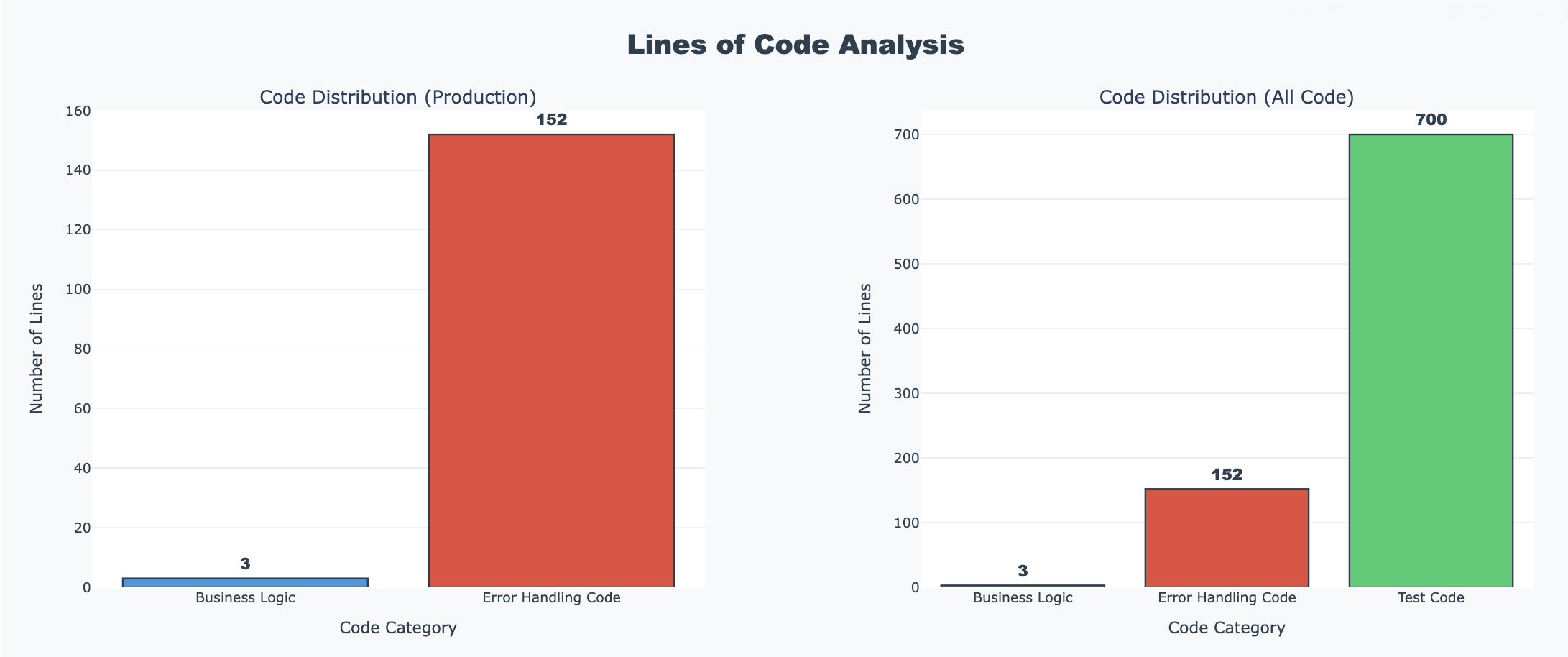
Yes. It's an extreme case but wow, a ratios of 3:152:700 for business logic:error handling code:test case code.
Just for fun, let's check coverage (scrollable image)
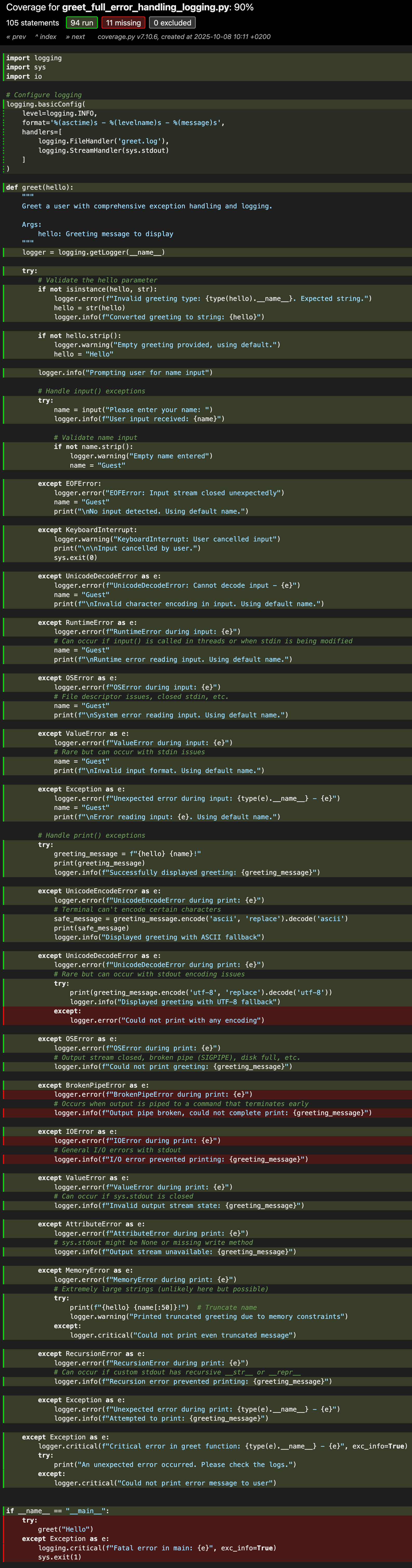
We could also try a more middle-of-the-road approach:
import logging

logging.basicConfig(level=logging.INFO)
logger = logging.getLogger(__name__)

def greet(hello):
    """Simple greeting function with basic error handling."""
    try:
        name = input("Please enter your name: ")
        if not name.strip():
            name = "Guest"
        print(f"{hello} {name}!")
    except KeyboardInterrupt:
        print("\n\nGoodbye!")
        return
    except EOFError:
        print("\nNo input detected.")
        return
    except Exception as e:
        logger.error(f"Unexpected error: {e}")
        print("Sorry, something went wrong!")

greet("Hello")
And a middle-of-the-road, more practical test case perhaps.
import pytest
from io import StringIO
import logging

from greet_practical import greet

class TestGreetPractical:
    """Practical test suite focusing on likely scenarios."""

    def test_normal_greeting(self, mocker):
        """Test the happy path - normal user input."""
        mock_input = mocker.patch('builtins.input', return_value='Alice')
        mock_print = mocker.patch('builtins.print')

        greet("Hello")

        mock_input.assert_called_once_with("Please enter your name: ")
        mock_print.assert_called_once_with("Hello Alice!")

    def test_empty_name_defaults_to_guest(self, mocker):
        """Test that empty input uses 'Guest' as default."""
        mock_input = mocker.patch('builtins.input', return_value='   ')
        mock_print = mocker.patch('builtins.print')

        greet("Hi")

        mock_print.assert_called_once_with("Hi Guest!")

    def test_keyboard_interrupt_exits_gracefully(self, mocker):
        """Test that Ctrl+C exits gracefully."""
        mock_input = mocker.patch('builtins.input', side_effect=KeyboardInterrupt())
        mock_print = mocker.patch('builtins.print')

        greet("Hello")

        mock_input.assert_called_once()
        mock_print.assert_called_once_with("\n\nGoodbye!")

    def test_eof_error_handled(self, mocker):
        """Test that EOF (e.g., piped input ending) is handled."""
        mock_input = mocker.patch('builtins.input', side_effect=EOFError())
        mock_print = mocker.patch('builtins.print')

        greet("Hello")

        mock_input.assert_called_once()
        mock_print.assert_called_once_with("\nNo input detected.")

    def test_unexpected_exception_logged(self, mocker, caplog):
        """Test that unexpected exceptions are logged and handled."""
        mock_input = mocker.patch('builtins.input',
                                  side_effect=RuntimeError("Unexpected error"))
        mock_print = mocker.patch('builtins.print')

        with caplog.at_level(logging.ERROR):
            greet("Hello")

        # Check that error was logged
        assert "Unexpected error" in caplog.text

        # Check that user-friendly message was printed
        mock_print.assert_called_once_with("Sorry, something went wrong!")

    def test_unicode_characters_work(self, mocker):
        """Test that unicode in names works correctly."""
        mock_input = mocker.patch('builtins.input', return_value='José')
        mock_print = mocker.patch('builtins.print')

        greet("¡Hola")

        mock_print.assert_called_once_with("¡Hola José!")

    def test_whitespace_trimmed_but_not_empty(self, mocker):
        """Test that names with content but extra whitespace work."""
        mock_input = mocker.patch('builtins.input', return_value='  Bob  ')
        mock_print = mocker.patch('builtins.print')

        greet("Hello")

        # The actual behavior: strip() checks if empty, but uses original value
        # This might be a bug in the implementation! Let's document the actual behavior
        mock_print.assert_called_once_with("Hello   Bob  !")

    @pytest.mark.parametrize("greeting,name,expected", [
        ("Hello", "Alice", "Hello Alice!"),
        ("Hi", "Bob", "Hi Bob!"),
        ("Greetings", "Charlie", "Greetings Charlie!"),
        ("Hey", "", "Hey Guest!"),
        ("Welcome", "   ", "Welcome Guest!"),
    ])
    def test_various_greetings_and_names(self, mocker, greeting, name, expected):
        """Parametrized test for common greeting/name combinations."""
        mock_input = mocker.patch('builtins.input', return_value=name)
        mock_print = mocker.patch('builtins.print')

        greet(greeting)

        mock_print.assert_called_once_with(expected)


class TestGreetIntegration:
    """Integration tests with minimal mocking."""

    def test_greet_end_to_end(self, mocker, capsys):
        """Test the function with real stdout (not mocked print)."""
        mock_input = mocker.patch('builtins.input', return_value='TestUser')

        greet("Hello")

        captured = capsys.readouterr()
        assert "Hello TestUser!" in captured.out

    def test_keyboard_interrupt_end_to_end(self, mocker, capsys):
        """Test Ctrl+C handling with real output."""
        mock_input = mocker.patch('builtins.input', side_effect=KeyboardInterrupt())

        greet("Hello")

        captured = capsys.readouterr()
        assert "Goodbye!" in captured.out


# Optional: Edge case tests if you want to be thorough
class TestGreetEdgeCases:
    """Optional edge case tests - only if you need extra confidence."""

    def test_none_as_name(self, mocker):
        """Test what happens if input somehow returns None."""
        mock_input = mocker.patch('builtins.input', return_value=None)
        mock_print = mocker.patch('builtins.print')

        # This will raise AttributeError on None.strip()
        greet("Hello")

        # Should be caught by generic exception handler
        assert mock_print.call_count == 1
        assert "something went wrong" in str(mock_print.call_args_list[0])

    def test_very_long_name(self, mocker):
        """Test with very long input (performance check)."""
        long_name = "A" * 10000
        mock_input = mocker.patch('builtins.input', return_value=long_name)
        mock_print = mocker.patch('builtins.print')

        greet("Hello")

        expected = f"Hello {long_name}!"
        mock_print.assert_called_once_with(expected)
% pytest test_greet_practical.py -v
============================= test session starts ==============================
platform darwin -- Python 3.12.11, pytest-8.4.1, pluggy-1.6.0 -- python3
cachedir: .pytest_cache
rootdir: ./
configfile: pyproject.toml
plugins: langsmith-0.4.29, cov-6.3.0, anyio-4.10.0, dash-3.2.0, mock-3.14.1
collected 16 items
test_greet_practical.py::TestGreetPractical::test_normal_greeting PASSED [ 6%]
test_greet_practical.py::TestGreetPractical::test_empty_name_defaults_to_guest PASSED [ 12%]
test_greet_practical.py::TestGreetPractical::test_keyboard_interrupt_exits_gracefully PASSED [ 18%]
test_greet_practical.py::TestGreetPractical::test_eof_error_handled PASSED [ 25%]
test_greet_practical.py::TestGreetPractical::test_unexpected_exception_logged PASSED [ 31%]
test_greet_practical.py::TestGreetPractical::test_unicode_characters_work PASSED [ 37%]
test_greet_practical.py::TestGreetPractical::test_whitespace_trimmed_but_not_empty PASSED [ 43%]
test_greet_practical.py::TestGreetPractical::test_various_greetings_and_names[Hello-Alice-Hello Alice!] PASSED [ 50%]
test_greet_practical.py::TestGreetPractical::test_various_greetings_and_names[Hi-Bob-Hi Bob!] PASSED [ 56%]
test_greet_practical.py::TestGreetPractical::test_various_greetings_and_names[Greetings-Charlie-Greetings Charlie!] PASSED [ 62%]
test_greet_practical.py::TestGreetPractical::test_various_greetings_and_names[Hey--Hey Guest!] PASSED [ 68%]
test_greet_practical.py::TestGreetPractical::test_various_greetings_and_names[Welcome- -Welcome Guest!] PASSED [ 75%]
test_greet_practical.py::TestGreetIntegration::test_greet_end_to_end PASSED [ 81%]
test_greet_practical.py::TestGreetIntegration::test_keyboard_interrupt_end_to_end PASSED [ 87%]
test_greet_practical.py::TestGreetEdgeCases::test_none_as_name PASSED [ 93%]
test_greet_practical.py::TestGreetEdgeCases::test_very_long_name PASSED [100%]
============================== 16 passed in 0.03s ==============================
%
And how it's ratios:
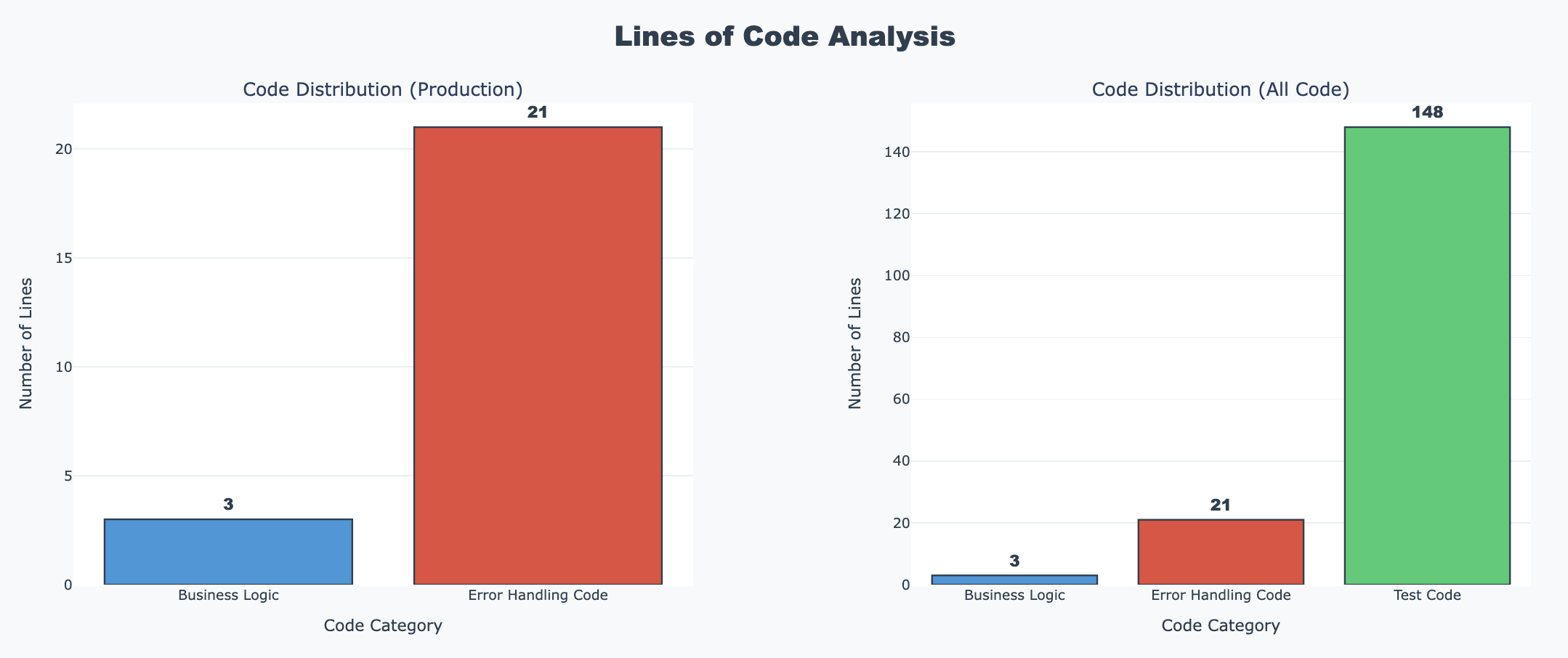
Still quite some differences and something to keep in mind in estimating the development effort.
And its coverage.
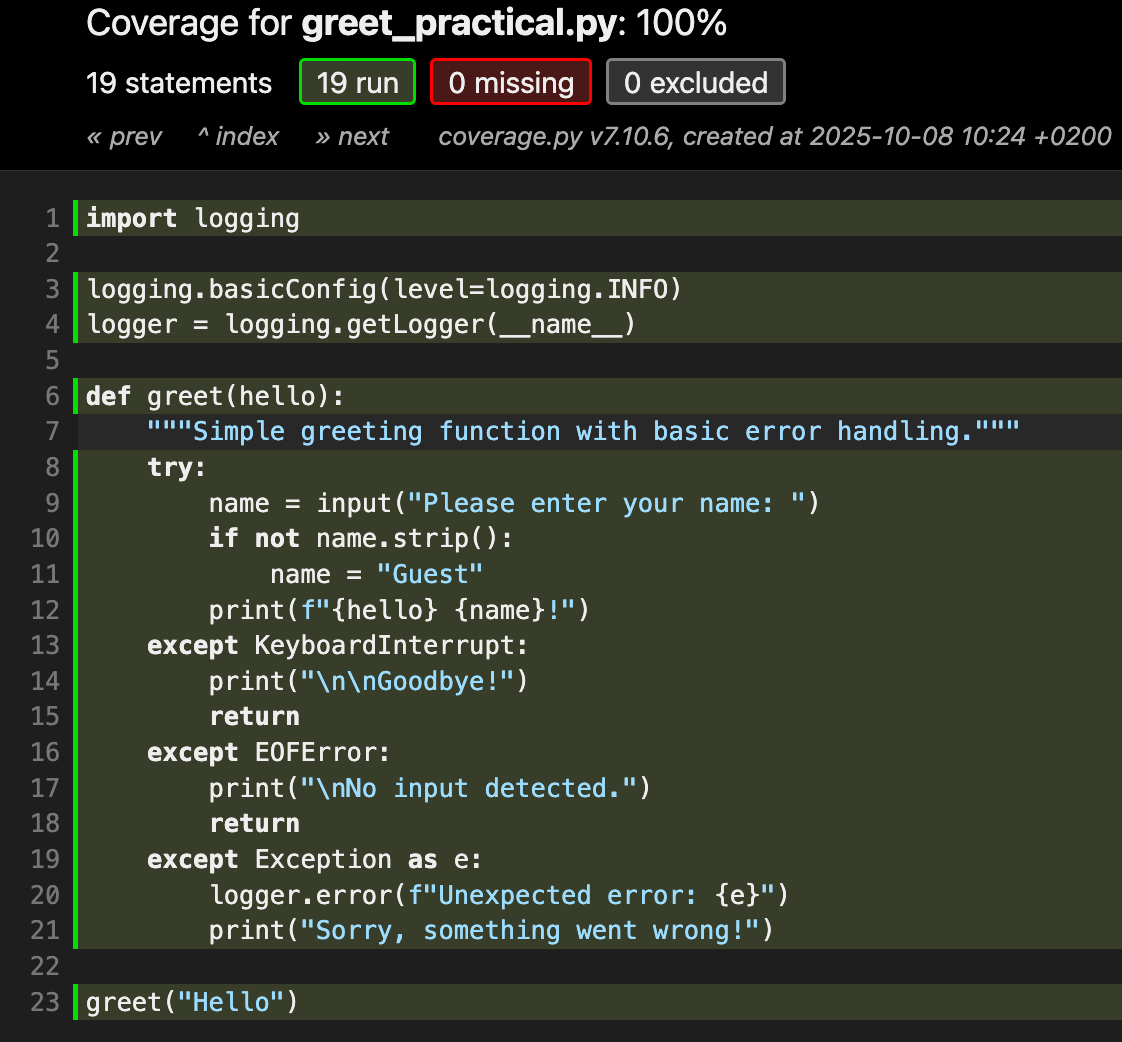
Just one more version of this program. Let's add a loop to the greet function and get some test cases for that version that control not only exceptions but also the ending conditions of the loop.
import logging

logging.basicConfig(level=logging.INFO)
logger = logging.getLogger(__name__)

def greet(hello):
    """Greet users in a loop until they choose to exit."""
    print("Welcome! Type 'exit' anytime to quit.")

    while True:
        try:
            name = input("\nPlease enter your name: ")

            # Check for exit command
            if name.lower() in ['exit', 'quit', 'q']:
                print("Goodbye!")
                break

            # Check for empty input
            if not name.strip():
                print("Name cannot be empty. Please try again.")
                continue

            print(f"{hello} {name}!")
        except KeyboardInterrupt:
            print("\n\nGoodbye!")
            break
        except EOFError:
            print("\nNo input detected. Exiting.")
            break
        except Exception as e:
            logger.error(f"Unexpected error: {e}")
            print("Sorry, something went wrong! Please try again.")
            # Continue the loop instead of breaking on unexpected errors

if __name__ == "__main__":
    greet("Hello")
And its test case:
import pytest
import logging
from unittest.mock import call


# Import the greet function
# from plain_greet import greet

from greet_with_loop import greet

class TestGreetLoop:
    """Test suite for the looping greet function."""

    def test_single_greeting_then_exit(self, mocker):
        """Test greeting one person then exiting."""
        mock_input = mocker.patch('builtins.input',
                                  side_effect=['Alice', 'exit'])
        mock_print = mocker.patch('builtins.print')

        greet("Hello")

        # Verify input was called twice (name + exit)
        assert mock_input.call_count == 2

        # Verify the greeting sequence
        assert call("Welcome! Type 'exit' anytime to quit.") in mock_print.call_args_list
        assert call("Hello Alice!") in mock_print.call_args_list
        assert call("Goodbye!") in mock_print.call_args_list

    def test_multiple_greetings_then_exit(self, mocker):
        """Test greeting multiple people before exiting."""
        mock_input = mocker.patch('builtins.input',
                                  side_effect=['Alice', 'Bob', 'Charlie', 'quit'])
        mock_print = mocker.patch('builtins.print')

        greet("Hi")

        # Verify all greetings were printed
        assert call("Hi Alice!") in mock_print.call_args_list
        assert call("Hi Bob!") in mock_print.call_args_list
        assert call("Hi Charlie!") in mock_print.call_args_list
        assert call("Goodbye!") in mock_print.call_args_list

    def test_exit_variations(self, mocker):
        """Test different exit commands (exit, quit, q)."""
        for exit_cmd in ['exit', 'quit', 'q', 'EXIT', 'QUIT', 'Q']:
            mock_input = mocker.patch('builtins.input', side_effect=[exit_cmd])
            mock_print = mocker.patch('builtins.print')

            greet("Hello")

            assert call("Goodbye!") in mock_print.call_args_list

    def test_empty_input_prompts_retry(self, mocker):
        """Test that empty input asks user to try again."""
        mock_input = mocker.patch('builtins.input',
                                  side_effect=['', '   ', 'Alice', 'exit'])
        mock_print = mocker.patch('builtins.print')

        greet("Hello")

        # Should print error message twice (for '' and '   ')
        error_calls = [c for c in mock_print.call_args_list
                      if 'cannot be empty' in str(c)]
        assert len(error_calls) == 2

        # Should eventually greet Alice
        assert call("Hello Alice!") in mock_print.call_args_list

    def test_keyboard_interrupt_exits_gracefully(self, mocker):
        """Test that Ctrl+C exits the loop gracefully."""
        mock_input = mocker.patch('builtins.input',
                                  side_effect=['Alice', KeyboardInterrupt()])
        mock_print = mocker.patch('builtins.print')

        greet("Hello")

        # Should greet Alice, then exit on KeyboardInterrupt
        assert call("Hello Alice!") in mock_print.call_args_list
        assert call("\n\nGoodbye!") in mock_print.call_args_list

    def test_eof_error_exits_loop(self, mocker):
        """Test that EOF exits the loop."""
        mock_input = mocker.patch('builtins.input',
                                  side_effect=['Alice', EOFError()])
        mock_print = mocker.patch('builtins.print')

        greet("Hello")

        assert call("Hello Alice!") in mock_print.call_args_list
        assert call("\nNo input detected. Exiting.") in mock_print.call_args_list

    def test_unexpected_error_continues_loop(self, mocker, caplog):
        """Test that unexpected errors don't break the loop."""
        mock_input = mocker.patch('builtins.input',
                                  side_effect=[
                                      'Alice',
                                      RuntimeError("Unexpected"),
                                      'Bob',
                                      'exit'
                                  ])
        mock_print = mocker.patch('builtins.print')

        with caplog.at_level(logging.ERROR):
            greet("Hello")

        # Should greet Alice
        assert call("Hello Alice!") in mock_print.call_args_list

        # Should log the error
        assert "Unexpected error" in caplog.text

        # Should print error message to user
        assert call("Sorry, something went wrong! Please try again.") in mock_print.call_args_list

        # Should continue and greet Bob
        assert call("Hello Bob!") in mock_print.call_args_list

        # Should eventually exit
        assert call("Goodbye!") in mock_print.call_args_list

    def test_immediate_exit(self, mocker):
        """Test exiting immediately without greeting anyone."""
        mock_input = mocker.patch('builtins.input', side_effect=['exit'])
        mock_print = mocker.patch('builtins.print')

        greet("Hello")

        # Should only print welcome and goodbye
        assert call("Welcome! Type 'exit' anytime to quit.") in mock_print.call_args_list
        assert call("Goodbye!") in mock_print.call_args_list

        # Should not greet anyone
        greeting_calls = [c for c in mock_print.call_args_list
                         if 'Hello' in str(c) and '!' in str(c) and 'Welcome' not in str(c)]
        assert len(greeting_calls) == 0

    def test_unicode_names(self, mocker):
        """Test that unicode characters work correctly."""
        mock_input = mocker.patch('builtins.input',
                                  side_effect=['José', 'François', '李明', 'exit'])
        mock_print = mocker.patch('builtins.print')

        greet("Hello")

        assert call("Hello José!") in mock_print.call_args_list
        assert call("Hello François!") in mock_print.call_args_list
        assert call("Hello 李明!") in mock_print.call_args_list

    def test_whitespace_in_valid_name(self, mocker):
        """Test names with leading/trailing whitespace but not empty."""
        mock_input = mocker.patch('builtins.input',
                                  side_effect=['  Alice  ', 'exit'])
        mock_print = mocker.patch('builtins.print')

        greet("Hello")

        # Should accept the name with whitespace (strip is only for empty check)
        assert call("Hello   Alice  !") in mock_print.call_args_list

    def test_numbers_as_names(self, mocker):
        """Test that numbers can be used as names."""
        mock_input = mocker.patch('builtins.input',
                                  side_effect=['123', '456', 'exit'])
        mock_print = mocker.patch('builtins.print')

        greet("Hello")

        assert call("Hello 123!") in mock_print.call_args_list
        assert call("Hello 456!") in mock_print.call_args_list

    @pytest.mark.parametrize("greeting", ["Hello", "Hi", "Greetings", "Welcome"])
    def test_different_greetings(self, mocker, greeting):
        """Test the function with different greeting messages."""
        mock_input = mocker.patch('builtins.input',
                                  side_effect=['Alice', 'exit'])
        mock_print = mocker.patch('builtins.print')

        greet(greeting)

        assert call(f"{greeting} Alice!") in mock_print.call_args_list


class TestGreetLoopIntegration:
    """Integration tests with minimal mocking."""

    def test_greet_with_real_stdout(self, mocker, capsys):
        """Test the function with real stdout (not mocked print)."""
        mock_input = mocker.patch('builtins.input',
                                  side_effect=['Alice', 'Bob', 'exit'])

        greet("Hello")

        captured = capsys.readouterr()
        assert "Welcome! Type 'exit' anytime to quit." in captured.out
        assert "Hello Alice!" in captured.out
        assert "Hello Bob!" in captured.out
        assert "Goodbye!" in captured.out

    def test_error_recovery_end_to_end(self, mocker, capsys, caplog):
        """Test error recovery with real output."""
        mock_input = mocker.patch('builtins.input',
                                  side_effect=[
                                      '',  # Empty
                                      'Alice',  # Valid
                                      RuntimeError("Test error"),  # Error
                                      'Bob',  # Valid after error
                                      'exit'
                                  ])

        with caplog.at_level(logging.ERROR):
            greet("Hello")

        captured = capsys.readouterr()

        # Check for empty name handling
        assert "cannot be empty" in captured.out

        # Check for successful greetings
        assert "Hello Alice!" in captured.out
        assert "Hello Bob!" in captured.out

        # Check for error message
        assert "something went wrong" in captured.out

        # Check for exit
        assert "Goodbye!" in captured.out


class TestGreetLoopEdgeCases:
    """Optional edge case tests."""

    def test_very_long_session(self, mocker):
        """Test greeting many people in one session."""
        names = [f"Person{i}" for i in range(100)]
        names.append('exit')

        mock_input = mocker.patch('builtins.input', side_effect=names)
        mock_print = mocker.patch('builtins.print')

        greet("Hello")

        # Verify all 100 people were greeted
        greeting_calls = [c for c in mock_print.call_args_list
                         if 'Hello Person' in str(c)]
        assert len(greeting_calls) == 100

    def test_mixed_case_exit_commands(self, mocker):
        """Test exit commands with mixed case."""
        mock_input = mocker.patch('builtins.input', side_effect=['ExIt'])
        mock_print = mocker.patch('builtins.print')

        greet("Hello")

        assert call("Goodbye!") in mock_print.call_args_list

    def test_alternating_errors_and_success(self, mocker, caplog):
        """Test alternating between errors and successful greetings."""
        mock_input = mocker.patch('builtins.input',
                                  side_effect=[
                                      'Alice',
                                      '',  # Empty
                                      'Bob',
                                      '   ',  # Whitespace only
                                      'Charlie',
                                      'exit'
                                  ])
        mock_print = mocker.patch('builtins.print')

        greet("Hello")

        # Should greet exactly 3 people
        greeting_calls = [c for c in mock_print.call_args_list
                         if 'Hello' in str(c) and '!' in str(c)
                         and 'Welcome' not in str(c) and 'Goodbye' not in str(c)]
        assert len(greeting_calls) == 3

        # Should show 2 error messages for empty inputs
        error_calls = [c for c in mock_print.call_args_list
                      if 'cannot be empty' in str(c)]
        assert len(error_calls) == 2
% pytest test_greet_with_loop.py -v
============================= test session starts ==============================
platform darwin -- Python 3.12.11, pytest-8.4.1, pluggy-1.6.0 -- python3
cachedir: .pytest_cache
rootdir: ./
configfile: pyproject.toml
plugins: langsmith-0.4.29, cov-6.3.0, anyio-4.10.0, dash-3.2.0, mock-3.14.1
collected 20 items
test_greet_with_loop.py::TestGreetLoop::test_single_greeting_then_exit PASSED [ 5%]
test_greet_with_loop.py::TestGreetLoop::test_multiple_greetings_then_exit PASSED [ 10%]
test_greet_with_loop.py::TestGreetLoop::test_exit_variations PASSED [ 15%]
test_greet_with_loop.py::TestGreetLoop::test_empty_input_prompts_retry PASSED [ 20%]
test_greet_with_loop.py::TestGreetLoop::test_keyboard_interrupt_exits_gracefully PASSED [ 25%]
test_greet_with_loop.py::TestGreetLoop::test_eof_error_exits_loop PASSED [ 30%]
test_greet_with_loop.py::TestGreetLoop::test_unexpected_error_continues_loop PASSED [ 35%]
test_greet_with_loop.py::TestGreetLoop::test_immediate_exit PASSED [ 40%]
test_greet_with_loop.py::TestGreetLoop::test_unicode_names PASSED [ 45%]
test_greet_with_loop.py::TestGreetLoop::test_whitespace_in_valid_name PASSED [ 50%]
test_greet_with_loop.py::TestGreetLoop::test_numbers_as_names PASSED [ 55%]
test_greet_with_loop.py::TestGreetLoop::test_different_greetings[Hello] PASSED [ 60%]
test_greet_with_loop.py::TestGreetLoop::test_different_greetings[Hi] PASSED [ 65%]
test_greet_with_loop.py::TestGreetLoop::test_different_greetings[Greetings] PASSED [ 70%]
test_greet_with_loop.py::TestGreetLoop::test_different_greetings[Welcome] PASSED [ 75%]
test_greet_with_loop.py::TestGreetLoopIntegration::test_greet_with_real_stdout PASSED [ 80%]
test_greet_with_loop.py::TestGreetLoopIntegration::test_error_recovery_end_to_end PASSED [ 85%]
test_greet_with_loop.py::TestGreetLoopEdgeCases::test_very_long_session PASSED [ 90%]
test_greet_with_loop.py::TestGreetLoopEdgeCases::test_mixed_case_exit_commands PASSED [ 95%]
test_greet_with_loop.py::TestGreetLoopEdgeCases::test_alternating_errors_and_success PASSED [100%]
============================== 20 passed in 0.06s ==============================
%
And its coverage.
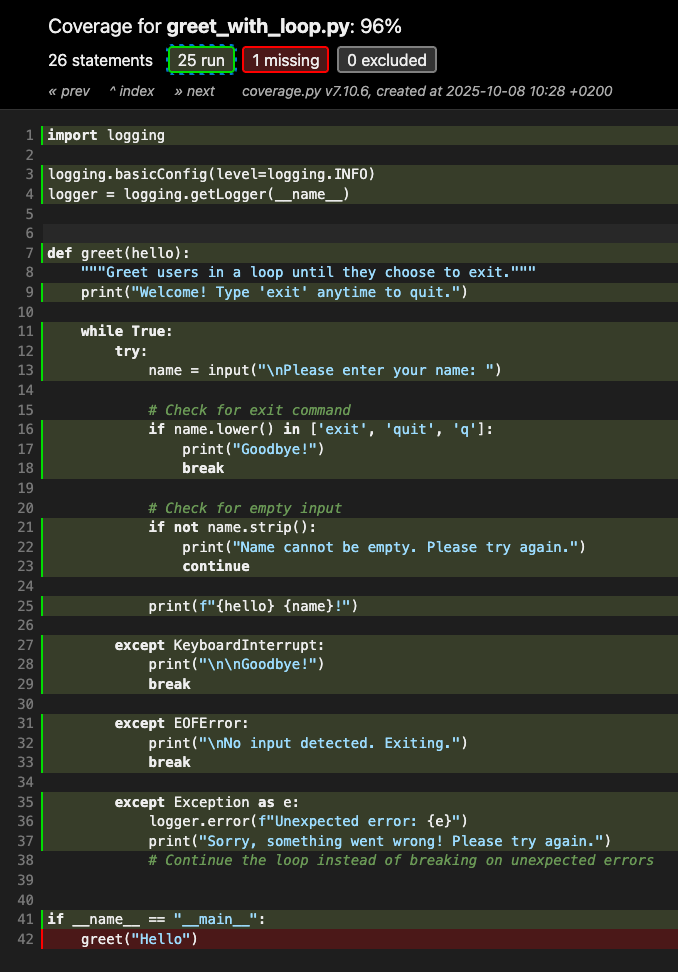
We could collaborate with Claude.ai and run a set of tests using bash with the Bash Automated Testing System (BATS). Technically, these could be considered integration or end-to-end tests since they operate outside the program.
#!/usr/bin/env bats

# Require minimum BATS version to avoid warnings
bats_require_minimum_version 1.5.0

# BATS tests for error conditions and exceptions

# ===== Testing for success (baseline) =====
@test "hello.py runs successfully" {
    run python hello.py
    [ "$status" -eq 0 ]
    [ "$output" = "Hello Python world!" ]
}

# ===== Testing for errors - exit code =====
@test "broken_pipe.py fails when piped to head" {
    run bash -c "python broken_pipe_print_only.py method1 | head -n 1"

    # The shell pipeline might return 0, so we check stderr instead
    # But we can also check with pipefail:
    run bash -c "set -o pipefail; python broken_pipe_print_only.py method1 2>&1 | head -n 1"

    # Should have non-zero exit code with pipefail
    [ "$status" -ne 0 ]
}

# ===== Testing that stderr contains error message =====
@test "broken_pipe.py shows BrokenPipeError in stderr" {
    run bash -c "python broken_pipe_print_only.py method1 2>&1 | head -n 1"

    # Check that error message appears in output
    [[ "$output" =~ "BrokenPipeError" ]]
}

# ===== Testing for specific exception text =====
@test "broken_pipe.py shows errno 32" {
    run bash -c "python broken_pipe_print_only.py method1 2>&1 | head -n 1"

    # Check for error - be flexible about format
    # macOS might show it differently than Linux
    [[ "$output" =~ "BrokenPipeError" ]] || [[ "$output" =~ "Broken pipe" ]]
}

# ===== Testing that a command fails (should NOT succeed) =====
@test "nonexistent file raises error" {
    run python nonexistent_file.py

    # Should fail
    [ "$status" -ne 0 ]

    # Should contain error message
    [[ "$output" =~ "No such file" ]] || [[ "$output" =~ "can't open file" ]]
}

# ===== Testing Python exceptions =====
@test "Python syntax error is caught" {
    run python -c "print('hello"  # Missing closing quote

    # Should fail
    [ "$status" -ne 0 ]

    # Should mention SyntaxError
    [[ "$output" =~ "SyntaxError" ]]
}

@test "Python runtime error is caught" {
    run python -c "print(1/0)"

    # Should fail
    [ "$status" -ne 0 ]

    # Should mention ZeroDivisionError
    [[ "$output" =~ "ZeroDivisionError" ]]
}

@test "Python ImportError is caught" {
    run python -c "import nonexistent_module"

    # Should fail
    [ "$status" -ne 0 ]

    # Should mention ModuleNotFoundError or ImportError
    [[ "$output" =~ "ModuleNotFoundError" ]] || [[ "$output" =~ "ImportError" ]]
}

# ===== Testing stderr separately from stdout =====
@test "error messages go to stderr" {
    # Create a Python script that prints to both stdout and stderr
    run bash -c "python -c 'import sys; print(\"stdout message\"); print(\"stderr message\", file=sys.stderr)' 2>&1"

    # Both should appear in output when using 2>&1
    [[ "$output" =~ "stdout message" ]]
    [[ "$output" =~ "stderr message" ]]
}

# ===== Testing that stderr is NOT empty on errors =====
@test "broken pipe produces stderr output" {
    run bash -c "python broken_pipe_print_only.py method1 2>&1 | head -n 1"

    # Output should not be empty (contains error)
    [ -n "$output" ]
}

# ===== Testing expected failures (negative testing) =====
@test "script fails with invalid argument" {
    run python broken_pipe_print_only.py invalid_method

    # Should fail or produce error message
    # Either non-zero exit or error in output
    [ "$status" -ne 0 ] || [[ "$output" =~ "Unknown" ]] || [[ "$output" =~ "error" ]]
}

# ===== Using ! to test that command should fail =====
@test "division by zero fails as expected" {
    run python -c "result = 1 / 0"

    # Explicitly test that it failed
    [ "$status" -ne 0 ]

    # Alternative: use ! to invert the test
    run ! python -c "result = 1 / 0"
}

# ===== Testing with multiple assertions =====
@test "comprehensive error checking" {
    run python -c "raise ValueError('test error')"

    # Check status
    [ "$status" -ne 0 ]

    # Check error type
    [[ "$output" =~ "ValueError" ]]

    # Check error message
    [[ "$output" =~ "test error" ]]
}

# ===== Testing timeout or hanging (using timeout command) =====
@test "script doesn't hang indefinitely" {
    # Check if timeout command exists (GNU coreutils)
    if command -v timeout &> /dev/null; then
        run timeout 2s python -c "import time; time.sleep(10)"
        [ "$status" -eq 124 ]
    elif command -v gtimeout &> /dev/null; then
        # macOS with GNU coreutils installed via brew
        run gtimeout 2s python -c "import time; time.sleep(10)"
        [ "$status" -eq 124 ]
    else
        # Use Python's own timeout via subprocess
        run python -c "import subprocess; subprocess.run(['python', '-c', 'import time; time.sleep(10)'], timeout=2)"
        # TimeoutExpired causes non-zero exit (uncaught exception)
        [ "$status" -ne 0 ]
        # Should mention timeout in output
        [[ "$output" =~ "Timeout" ]] || [[ "$output" =~ "timeout" ]]
    fi
}

# ===== Testing file doesn't exist =====
@test "missing input file produces error" {
    run python -c "open('nonexistent.txt').read()"

    [ "$status" -ne 0 ]
    [[ "$output" =~ "FileNotFoundError" ]] || [[ "$output" =~ "No such file" ]]
}

# ===== Helper function for repeated error checking =====
check_error_contains() {
    local expected_error="$1"
    [[ "$output" =~ "$expected_error" ]]
}

@test "using helper function for error checking" {
    run python -c "raise RuntimeError('custom error')"

    [ "$status" -ne 0 ]
    check_error_contains "RuntimeError"
    check_error_contains "custom error"
}
bats bats_error_testing.bats
bats_error_testing.bats
✓ hello.py runs successfully
✓ broken_pipe.py fails when piped to head
✓ broken_pipe.py shows BrokenPipeError in stderr
✓ broken_pipe.py shows errno 32
✓ nonexistent file raises error
✓ Python syntax error is caught
✓ Python runtime error is caught
✓ Python ImportError is caught
✓ error messages go to stderr
✓ broken pipe produces stderr output
✓ script fails with invalid argument
✓ division by zero fails as expected
✓ comprehensive error checking
✓ script doesn't hang indefinitely
✓ missing input file produces error
✓ using helper function for error checking
16 tests, 0 failures
We can raise the level of abstraction even further with some BDD tests. We can also colloborate with Claude.ai on this.
Here's what the BDD style feature files could look like for the comprehensive set of tests we had above. Each tab as a different feature file. Perhaps these and the BATS tests above serve as a comprehensive set of User Acceptance Tests (UATs).
Feature: Basic Greeting Functionality
  As a user
  I want to be greeted by name
  So that I feel welcomed

  Scenario: Successfully greet a user
    Given the greeting message is "Hello"
    When the user enters their name "Alice"
    Then the system should display "Hello Alice!"
    And the system should log "User input received: Alice"

  Scenario: Handle empty name input
    Given the greeting message is "Hi"
    When the user enters an empty name "   "
    Then the system should display "Hi Guest!"
    And the system should log a warning about empty name

  Scenario: Convert non-string greeting to string
    Given the greeting message is the number 123
    When the user enters their name "Bob"
    Then the system should display "123 Bob!"
    And the system should log an error about invalid greeting type

  Scenario: Use default greeting for empty greeting parameter
    Given the greeting message is empty "   "
    When the user enters their name "Charlie"
    Then the system should display "Hello Charlie!"
    And the system should log a warning about empty greeting

  Scenario: Handle None as greeting parameter
    Given the greeting message is None
    When the user enters their name "User"
    Then the system should display "None User!"
    And the system should log error about NoneType

  Scenario: Handle unicode in both greeting and name
    Given the greeting message is "¡Hola"
    When the user enters their name "José"
    Then the system should display "¡Hola José!"

  Scenario Outline: Test various greeting and name combinations
    Given the greeting message is ""
    When the user enters their name ""
    Then the system should display ""

    Examples:
      | greeting   | name     | expected            |
      | Hello      | Alice    | Hello Alice!        |
      | Hi         | Bob      | Hi Bob!             |
      | Hey        | Charlie  | Hey Charlie!        |
      | Greetings  | Dave     | Greetings Dave!     |
Feature: Input Error Handling
As a system
I want to handle input errors gracefully
So that the program doesn't crash
Scenario: Handle EOF error during input
Given the greeting message is "Hello"
When input stream ends unexpectedly with EOFError
Then the system should display an error message about no input
And the system should greet "Hello Guest!"
And the system should log EOF error
Scenario: Handle keyboard interrupt during input
Given the greeting message is "Hello"
When the user presses Ctrl+C with KeyboardInterrupt
Then the system should display "Input cancelled by user"
And the system should exit gracefully
And the system should log keyboard interrupt
Scenario: Handle Unicode decode error during input
Given the greeting message is "Hello"
When input contains invalid unicode with UnicodeDecodeError
Then the system should display an error about character encoding
And the system should greet "Hello Guest!"
And the system should log unicode decode error
Scenario: Handle runtime error during input
Given the greeting message is "Hello"
When input raises RuntimeError with message "Input error"
Then the system should display an error message
And the system should greet "Hello Guest!"
And the system should log runtime error
Scenario: Handle OS error during input
Given the greeting message is "Hello"
When input raises OSError with message "File descriptor error"
Then the system should display an error message
And the system should greet "Hello Guest!"
And the system should log OS error
Scenario: Handle unexpected exception during input
Given the greeting message is "Hello"
When input raises unexpected Exception
Then the system should display an error message
And the system should greet "Hello Guest!"
And the system should log unexpected errorFeature: Print Error Handling
As a system
I want to handle output errors gracefully
So that errors are logged even when display fails
Scenario: Handle Unicode encode error during print
Given the greeting message is "Hello"
When the user enters their name "José"
And print raises UnicodeEncodeError
Then the system should use ASCII fallback
And the system should log unicode encode error
Scenario: Handle OS error during print
Given the greeting message is "Hello"
When the user enters their name "Eve"
And print raises OSError with message "Output error"
Then the system should not display the greeting
And the system should log the greeting message
And the system should log OS error during print
Scenario: Handle broken pipe error during print
Given the greeting message is "Hello"
When the user enters their name "Frank"
And print raises BrokenPipeError with message "Pipe broken"
Then the system should not display the greeting
And the system should log broken pipe or OS error
Scenario: Handle memory error during print
Given the greeting message is "Hello"
When the user enters their name "Jack"
And print raises MemoryError
Then the system should attempt truncated greeting
And the system should log memory error
Scenario: Handle memory error with complete failure
Given the greeting message is "Hello"
When the user enters their name "Kate"
And print always raises MemoryError
Then the system should log critical error about truncation failure
And the system should log memory error
Scenario: Handle recursion error during print
Given the greeting message is "Hello"
When the user enters their name "Liam"
And print raises RecursionError
Then the system should not display the greeting
And the system should log recursion errorFeature: Critical Error Handling
As a system
I want to log critical errors when unexpected failures occur
So that developers can diagnose issues
Scenario: Handle critical error in outer exception handler
Given the greeting message is "Hello"
When a critical error occurs in logging
Then the system should log critical error
And the system should display generic error message to user
Scenario: Handle critical error when error message print fails
Given the greeting message is "Hello"
When a critical error occurs in logging
And print also fails with OSError
Then the system should log critical error
And the system should log print failure
Scenario: Handle exception during greeting construction
Given the greeting message is "Hello"
When input returns an object that fails during string conversion
Then the system should log the conversion error
And the system should handle the error gracefullyFeature: Edge Cases and Multiple Errors
As a system
I want to handle complex error scenarios
So that the system is robust
Scenario: Handle both input and print errors
Given the greeting message is "Hello"
When input raises EOFError
And print raises OSError
Then the system should log EOF error
And the system should log OS error
And the system should attempt greeting twice
Scenario: Handle None as greeting parameter
Given the greeting message is None
When the user enters their name "User"
Then the system should display "None User!"
And the system should log error about NoneType
Scenario: Handle unicode in both greeting and name
Given the greeting message is "¡Hola"
When the user enters their name "José"
Then the system should display "¡Hola José!"
Scenario Outline: Test various greeting and name combinations
Given the greeting message is ""
When the user enters their name ""
Then the system should display ""
Examples:
| greeting | name | expected |
| Hello | Alice | Hello Alice! |
| Hi | Bob | Hi Bob! |
| Hey | Charlie | Hey Charlie! |
| Greetings | Dave | Greetings Dave! | % behave
USING RUNNER: behave.runner:Runner
Feature: Basic Greeting Functionality # features/greet_basic.feature:1
As a user
I want to be greeted by name
So that I feel welcomed
Scenario: Successfully greet a user # features/greet_basic.feature:6
Given the greeting message is "Hello" # features/steps/greet_steps.py:13 0.000s
When the user enters their name "Alice" # features/steps/greet_steps.py:35 0.001s
Then the system should display "Hello Alice!" # features/steps/greet_steps.py:365 0.000s
And the system should log "User input received: Alice" # features/steps/greet_steps.py:443 0.000s
Scenario: Handle empty name input # features/greet_basic.feature:12
Given the greeting message is "Hi" # features/steps/greet_steps.py:13 0.000s
When the user enters an empty name " " # features/steps/greet_steps.py:50 0.000s
Then the system should display "Hi Guest!" # features/steps/greet_steps.py:365 0.000s
And the system should log a warning about empty name # features/steps/greet_steps.py:456 0.000s
Scenario: Convert non-string greeting to string # features/greet_basic.feature:18
Given the greeting message is the number 123 # features/steps/greet_steps.py:18 0.000s
When the user enters their name "Bob" # features/steps/greet_steps.py:35 0.000s
Then the system should display "123 Bob!" # features/steps/greet_steps.py:365 0.000s
And the system should log an error about invalid greeting type # features/steps/greet_steps.py:464 0.000s
Scenario: Use default greeting for empty greeting parameter # features/greet_basic.feature:24
Given the greeting message is empty " " # features/steps/greet_steps.py:23 0.000s
When the user enters their name "Charlie" # features/steps/greet_steps.py:35 0.000s
Then the system should display "Hello Charlie!" # features/steps/greet_steps.py:365 0.000s
And the system should log a warning about empty greeting # features/steps/greet_steps.py:472 0.000s
Scenario: Handle None as greeting parameter # features/greet_basic.feature:30
Given the greeting message is None # features/steps/greet_steps.py:28 0.000s
When the user enters their name "User" # features/steps/greet_steps.py:35 0.001s
Then the system should display "None User!" # features/steps/greet_steps.py:365 0.000s
And the system should log error about NoneType # features/steps/greet_steps.py:616 0.000s
Scenario: Handle unicode in both greeting and name # features/greet_basic.feature:36
Given the greeting message is "¡Hola" # features/steps/greet_steps.py:13 0.000s
When the user enters their name "José" # features/steps/greet_steps.py:35 0.000s
Then the system should display "¡Hola José!" # features/steps/greet_steps.py:365 0.000s
Scenario Outline: Test various greeting and name combinations -- @1.1 # features/greet_basic.feature:48
Given the greeting message is "Hello" # features/steps/greet_steps.py:13 0.000s
When the user enters their name "Alice" # features/steps/greet_steps.py:35 0.000s
Then the system should display "Hello Alice!" # features/steps/greet_steps.py:365 0.000s
Scenario Outline: Test various greeting and name combinations -- @1.2 # features/greet_basic.feature:49
Given the greeting message is "Hi" # features/steps/greet_steps.py:13 0.000s
When the user enters their name "Bob" # features/steps/greet_steps.py:35 0.000s
Then the system should display "Hi Bob!" # features/steps/greet_steps.py:365 0.000s
Scenario Outline: Test various greeting and name combinations -- @1.3 # features/greet_basic.feature:50
Given the greeting message is "Hey" # features/steps/greet_steps.py:13 0.000s
When the user enters their name "Charlie" # features/steps/greet_steps.py:35 0.000s
Then the system should display "Hey Charlie!" # features/steps/greet_steps.py:365 0.000s
Scenario Outline: Test various greeting and name combinations -- @1.4 # features/greet_basic.feature:51
Given the greeting message is "Greetings" # features/steps/greet_steps.py:13 0.000s
When the user enters their name "Dave" # features/steps/greet_steps.py:35 0.000s
Then the system should display "Greetings Dave!" # features/steps/greet_steps.py:365 0.000s
Feature: Critical Error Handling # features/greet_critical_errors.feature:1
As a system
I want to log critical errors when unexpected failures occur
So that developers can diagnose issues
Scenario: Handle critical error in outer exception handler # features/greet_critical_errors.feature:6
Given the greeting message is "Hello" # features/steps/greet_steps.py:13 0.000s
When a critical error occurs in logging # features/steps/greet_steps.py:303 0.000s
Then the system should log critical error # features/steps/greet_steps.py:582 0.000s
And the system should display generic error message to user # features/steps/greet_steps.py:396 0.000s
Scenario: Handle critical error when error message print fails # features/greet_critical_errors.feature:12
Given the greeting message is "Hello" # features/steps/greet_steps.py:13 0.000s
When a critical error occurs in logging # features/steps/greet_steps.py:303 0.000s
And print also fails with OSError # features/steps/greet_steps.py:328 0.000s
Then the system should log critical error # features/steps/greet_steps.py:582 0.000s
And the system should log print failure # features/steps/greet_steps.py:597 0.000s
Scenario: Handle exception during greeting construction # features/greet_critical_errors.feature:19
Given the greeting message is "Hello" # features/steps/greet_steps.py:13 0.000s
When input returns an object that fails during string conversion # features/steps/greet_steps.py:333 0.000s
Then the system should log the conversion error # features/steps/greet_steps.py:603 0.000s
And the system should handle the error gracefully # features/steps/greet_steps.py:632 0.000s
Feature: Edge Cases and Multiple Errors # features/greet_edge_cases.feature:1
As a system
I want to handle complex error scenarios
So that the system is robust
Scenario: Handle both input and print errors # features/greet_edge_cases.feature:6
Given the greeting message is "Hello" # features/steps/greet_steps.py:13 0.000s
When input raises EOFError # features/steps/greet_steps.py:155 0.000s
And print raises OSError # features/steps/greet_steps.py:217 0.000s
Then the system should log EOF error # features/steps/greet_steps.py:481 0.000s
And the system should log OS error # features/steps/greet_steps.py:514 0.000s
And the system should attempt greeting twice # features/steps/greet_steps.py:434 0.000s
Scenario: Handle None as greeting parameter # features/greet_edge_cases.feature:14
Given the greeting message is None # features/steps/greet_steps.py:28 0.000s
When the user enters their name "User" # features/steps/greet_steps.py:35 0.000s
Then the system should display "None User!" # features/steps/greet_steps.py:365 0.000s
And the system should log error about NoneType # features/steps/greet_steps.py:616 0.000s
Scenario: Handle unicode in both greeting and name # features/greet_edge_cases.feature:20
Given the greeting message is "¡Hola" # features/steps/greet_steps.py:13 0.000s
When the user enters their name "José" # features/steps/greet_steps.py:35 0.001s
Then the system should display "¡Hola José!" # features/steps/greet_steps.py:365 0.000s
Scenario Outline: Test various greeting and name combinations -- @1.1 # features/greet_edge_cases.feature:32
Given the greeting message is "Hello" # features/steps/greet_steps.py:13 0.000s
When the user enters their name "Alice" # features/steps/greet_steps.py:35 0.000s
Then the system should display "Hello Alice!" # features/steps/greet_steps.py:365 0.000s
Scenario Outline: Test various greeting and name combinations -- @1.2 # features/greet_edge_cases.feature:33
Given the greeting message is "Hi" # features/steps/greet_steps.py:13 0.000s
When the user enters their name "Bob" # features/steps/greet_steps.py:35 0.000s
Then the system should display "Hi Bob!" # features/steps/greet_steps.py:365 0.000s
Scenario Outline: Test various greeting and name combinations -- @1.3 # features/greet_edge_cases.feature:34
Given the greeting message is "Hey" # features/steps/greet_steps.py:13 0.000s
When the user enters their name "Charlie" # features/steps/greet_steps.py:35 0.000s
Then the system should display "Hey Charlie!" # features/steps/greet_steps.py:365 0.000s
Scenario Outline: Test various greeting and name combinations -- @1.4 # features/greet_edge_cases.feature:35
Given the greeting message is "Greetings" # features/steps/greet_steps.py:13 0.000s
When the user enters their name "Dave" # features/steps/greet_steps.py:35 0.000s
Then the system should display "Greetings Dave!" # features/steps/greet_steps.py:365 0.000s
Feature: Input Error Handling # features/greet_input_errors.feature:1
As a system
I want to handle input errors gracefully
So that the program doesn't crash
Scenario: Handle EOF error during input # features/greet_input_errors.feature:6
Given the greeting message is "Hello" # features/steps/greet_steps.py:13 0.000s
When input stream ends unexpectedly with EOFError # features/steps/greet_steps.py:57 0.000s
Then the system should display an error message about no input # features/steps/greet_steps.py:372 0.000s
And the system should greet "Hello Guest!" # features/steps/greet_steps.py:404 0.000s
And the system should log EOF error # features/steps/greet_steps.py:481 0.000s
Scenario: Handle keyboard interrupt during input # features/greet_input_errors.feature:13
Given the greeting message is "Hello" # features/steps/greet_steps.py:13 0.000s
When the user presses Ctrl+C with KeyboardInterrupt # features/steps/greet_steps.py:72 0.000s
Then the system should display "Input cancelled by user" # features/steps/greet_steps.py:365 0.000s
And the system should exit gracefully # features/steps/greet_steps.py:626 0.000s
And the system should log keyboard interrupt # features/steps/greet_steps.py:490 0.000s
Scenario: Handle Unicode decode error during input # features/greet_input_errors.feature:20
Given the greeting message is "Hello" # features/steps/greet_steps.py:13 0.000s
When input contains invalid unicode with UnicodeDecodeError # features/steps/greet_steps.py:95 0.000s
Then the system should display an error about character encoding # features/steps/greet_steps.py:379 0.000s
And the system should greet "Hello Guest!" # features/steps/greet_steps.py:404 0.000s
And the system should log unicode decode error # features/steps/greet_steps.py:498 0.000s
Scenario: Handle runtime error during input # features/greet_input_errors.feature:27
Given the greeting message is "Hello" # features/steps/greet_steps.py:13 0.000s
When input raises RuntimeError with message "Input error" # features/steps/greet_steps.py:110 0.000s
Then the system should display an error message # features/steps/greet_steps.py:387 0.000s
And the system should greet "Hello Guest!" # features/steps/greet_steps.py:404 0.000s
And the system should log runtime error # features/steps/greet_steps.py:506 0.000s
Scenario: Handle OS error during input # features/greet_input_errors.feature:34
Given the greeting message is "Hello" # features/steps/greet_steps.py:13 0.000s
When input raises OSError with message "File descriptor error" # features/steps/greet_steps.py:125 0.000s
Then the system should display an error message # features/steps/greet_steps.py:387 0.000s
And the system should greet "Hello Guest!" # features/steps/greet_steps.py:404 0.000s
And the system should log OS error # features/steps/greet_steps.py:514 0.000s
Scenario: Handle unexpected exception during input # features/greet_input_errors.feature:41
Given the greeting message is "Hello" # features/steps/greet_steps.py:13 0.000s
When input raises unexpected Exception # features/steps/greet_steps.py:140 0.000s
Then the system should display an error message # features/steps/greet_steps.py:387 0.000s
And the system should greet "Hello Guest!" # features/steps/greet_steps.py:404 0.000s
And the system should log unexpected error # features/steps/greet_steps.py:522 0.000s
Feature: Print Error Handling # features/greet_print_errors.feature:1
As a system
I want to handle output errors gracefully
So that errors are logged even when display fails
Scenario: Handle Unicode encode error during print # features/greet_print_errors.feature:6
Given the greeting message is "Hello" # features/steps/greet_steps.py:13 0.000s
When the user enters their name "José" # features/steps/greet_steps.py:35 0.001s
And print raises UnicodeEncodeError # features/steps/greet_steps.py:173 0.000s
Then the system should use ASCII fallback # features/steps/greet_steps.py:417 0.000s
And the system should log unicode encode error # features/steps/greet_steps.py:531 0.000s
Scenario: Handle OS error during print # features/greet_print_errors.feature:13
Given the greeting message is "Hello" # features/steps/greet_steps.py:13 0.000s
When the user enters their name "Eve" # features/steps/greet_steps.py:35 0.000s
And print raises OSError with message "Output error" # features/steps/greet_steps.py:198 0.000s
Then the system should not display the greeting # features/steps/greet_steps.py:411 0.000s
And the system should log the greeting message # features/steps/greet_steps.py:539 0.000s
And the system should log OS error during print # features/steps/greet_steps.py:548 0.000s
Scenario: Handle broken pipe error during print # features/greet_print_errors.feature:21
Given the greeting message is "Hello" # features/steps/greet_steps.py:13 0.000s
When the user enters their name "Frank" # features/steps/greet_steps.py:35 0.000s
And print raises BrokenPipeError with message "Pipe broken" # features/steps/greet_steps.py:223 0.000s
Then the system should not display the greeting # features/steps/greet_steps.py:411 0.000s
And the system should log broken pipe or OS error # features/steps/greet_steps.py:557 0.000s
Scenario: Handle memory error during print # features/greet_print_errors.feature:28
Given the greeting message is "Hello" # features/steps/greet_steps.py:13 0.000s
When the user enters their name "Jack" # features/steps/greet_steps.py:35 0.000s
And print raises MemoryError # features/steps/greet_steps.py:241 0.000s
Then the system should attempt truncated greeting # features/steps/greet_steps.py:427 0.000s
And the system should log memory error # features/steps/greet_steps.py:566 0.000s
Scenario: Handle memory error with complete failure # features/greet_print_errors.feature:35
Given the greeting message is "Hello" # features/steps/greet_steps.py:13 0.000s
When the user enters their name "Kate" # features/steps/greet_steps.py:35 0.000s
And print always raises MemoryError # features/steps/greet_steps.py:265 0.000s
Then the system should log critical error about truncation failure # features/steps/greet_steps.py:589 0.000s
And the system should log memory error # features/steps/greet_steps.py:566 0.000s
Scenario: Handle recursion error during print # features/greet_print_errors.feature:42
Given the greeting message is "Hello" # features/steps/greet_steps.py:13 0.000s
When the user enters their name "Liam" # features/steps/greet_steps.py:35 0.000s
And print raises RecursionError # features/steps/greet_steps.py:283 0.001s
Then the system should not display the greeting # features/steps/greet_steps.py:411 0.000s
And the system should log recursion error # features/steps/greet_steps.py:574 0.000s
5 features passed, 0 failed, 0 skipped
32 scenarios passed, 0 failed, 0 skipped
134 steps passed, 0 failed, 0 skipped
Took 0min 0.021s
%
And some documentation for non programmers (or programmers 😄)(scrollable image)

We could also create documentation on this all.
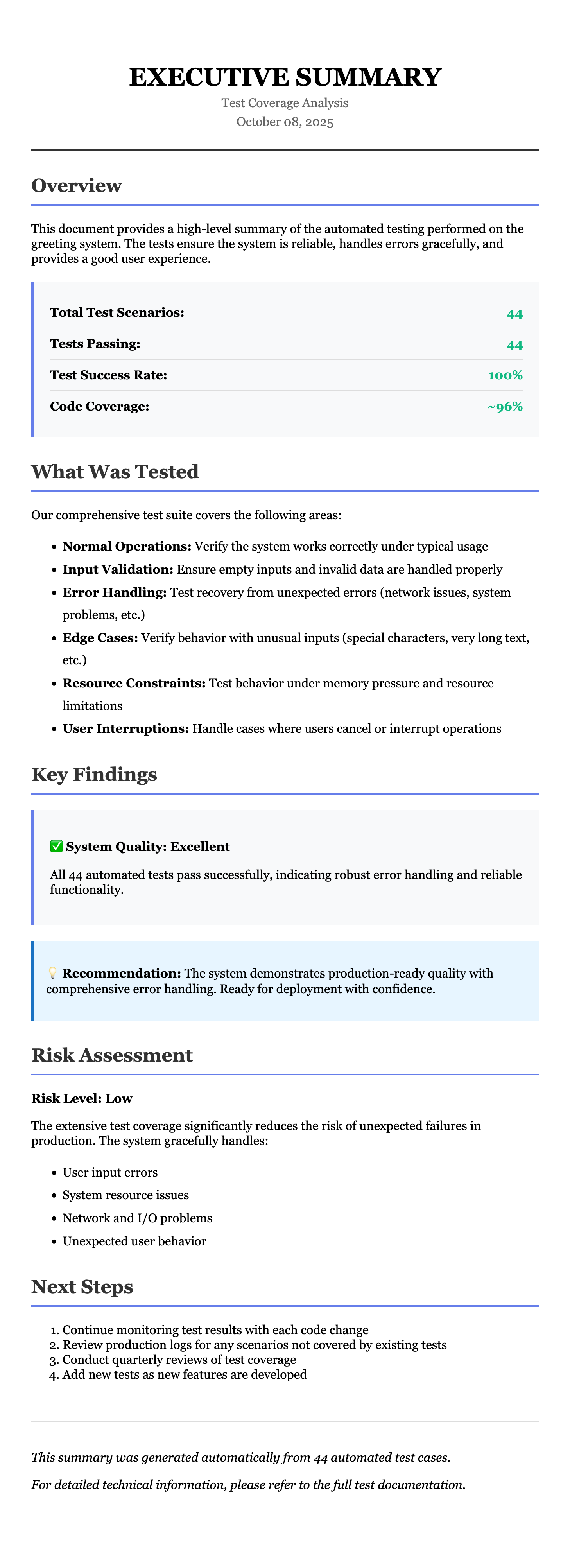
And some more documentation:(scrollable image)

As a final mention, we could even view this hello world program as a system.
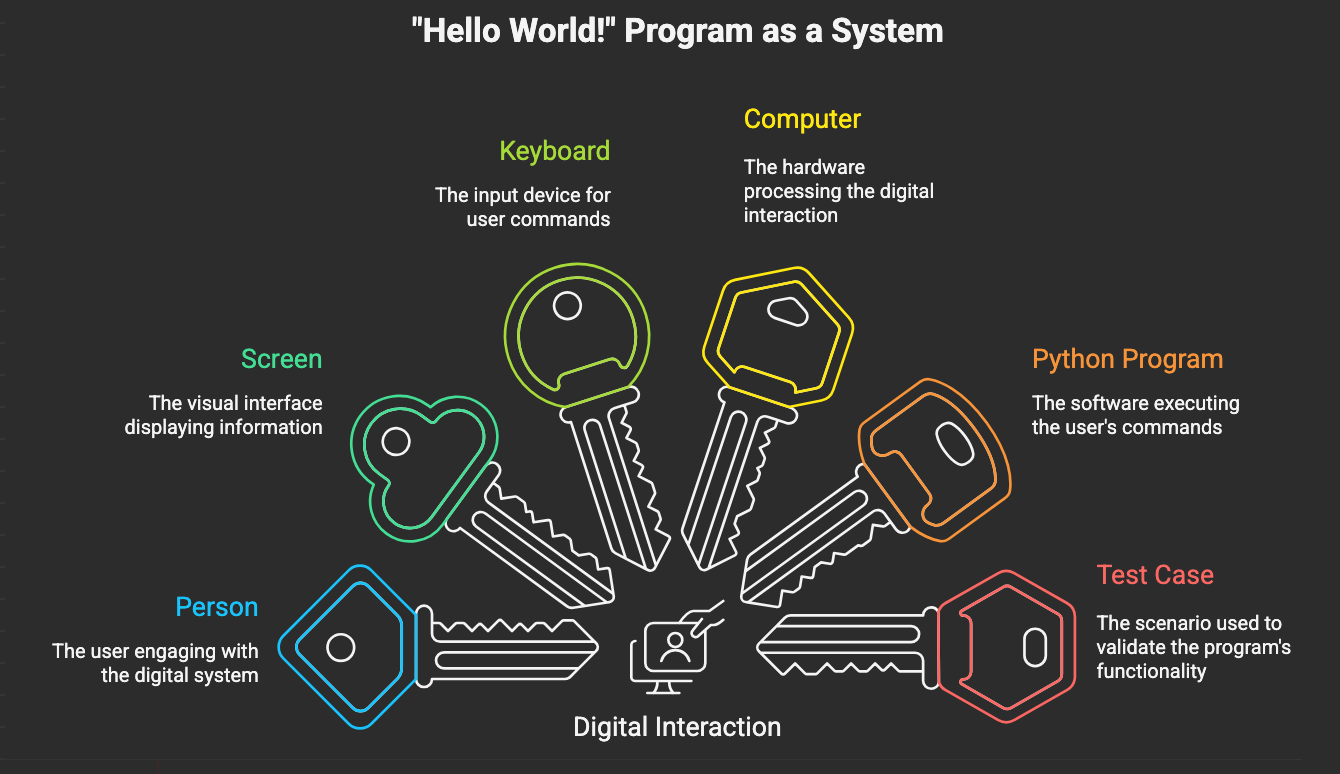
We could even dive into a bunch of SysML diagrams and files to describe this "system".
First a sysml v2 textual description:
/**
* SysML v2 Model: Hello World Greeting System
* A comprehensive model of the greeting system including requirements,
* structure, behavior, and test architecture.
*/
// ============================================================================
// PART 1: REQUIREMENTS
// ============================================================================
package HelloWorldRequirements {
requirement GreetingSystemRequirements {
doc /* The greeting system shall provide robust user interaction */
requirement FunctionalRequirements {
doc /* Core functional capabilities */
requirement GreetUser {
doc /* The system shall greet the user by name */
subject system : GreetingSystem;
require constraint { system.output.contains(system.input.userName) }
}
requirement AcceptUserInput {
doc /* The system shall accept user name input */
subject system : GreetingSystem;
}
requirement DisplayOutput {
doc /* The system shall display greeting output */
subject system : GreetingSystem;
}
requirement CustomizableGreeting {
doc /* The system shall support customizable greeting messages */
subject system : GreetingSystem;
}
}
requirement ErrorHandlingRequirements {
doc /* Error handling and resilience requirements */
requirement HandleEmptyInput {
doc /* The system shall handle empty user input gracefully */
subject system : GreetingSystem;
require constraint {
if (system.input.isEmpty())
system.output.contains("Guest")
}
}
requirement HandleEOFError {
doc /* The system shall handle end-of-file errors */
subject system : GreetingSystem;
}
requirement HandleKeyboardInterrupt {
doc /* The system shall handle Ctrl+C gracefully */
subject system : GreetingSystem;
}
requirement HandleUnicodeErrors {
doc /* The system shall handle unicode encoding/decoding errors */
subject system : GreetingSystem;
}
requirement HandlePrintErrors {
doc /* The system shall handle output display errors */
subject system : GreetingSystem;
}
requirement HandleMemoryErrors {
doc /* The system shall attempt recovery from memory errors */
subject system : GreetingSystem;
}
requirement HandleOSErrors {
doc /* The system shall handle operating system errors */
subject system : GreetingSystem;
}
}
requirement LoggingRequirements {
doc /* Logging and observability requirements */
requirement LogUserInput {
doc /* The system shall log user input */
subject system : GreetingSystem;
}
requirement LogErrors {
doc /* The system shall log all errors */
subject system : GreetingSystem;
}
requirement LogCriticalFailures {
doc /* The system shall log critical failures */
subject system : GreetingSystem;
}
}
requirement QualityRequirements {
doc /* Non-functional quality requirements */
requirement Robustness {
doc /* The system shall be robust and not crash */
subject system : GreetingSystem;
}
requirement InternationalSupport {
doc /* The system shall support international characters */
subject system : GreetingSystem;
}
requirement Testability {
doc /* The system shall be fully testable */
subject system : GreetingSystem;
}
}
}
}
// ============================================================================
// PART 2: STRUCTURE - PARTS AND CONNECTIONS
// ============================================================================
package HelloWorldStructure {
// Core System Parts
part def User {
doc /* Human user of the greeting system */
attribute name : String;
port inputPort : UserInputPort;
port outputPort : UserOutputPort;
action provideName {
doc /* User provides their name */
out userName : String;
}
action viewGreeting {
doc /* User views the greeting message */
in greetingMessage : String;
}
}
part def InputSystem {
doc /* Keyboard or file input system */
port userSide : UserInputPort;
port programSide : ProgramInputPort;
attribute inputSource : InputSourceType;
action captureInput {
doc /* Capture input from user */
in source : InputSourceType;
out data : String;
}
variant attribute inputSource : InputSourceType {
variant keyboardInput;
variant fileInput;
variant streamInput;
}
}
part def PythonProgram {
doc /* The main greeting program */
port inputPort : ProgramInputPort;
port outputPort : ProgramOutputPort;
port logPort : LogPort;
attribute greetingMessage : String = "Hello";
action greet {
doc /* Main greeting function */
in greeting : String;
out result : String;
action readInput {
in via inputPort;
out userName : String;
}
action validateInput {
in userName : String;
out validatedName : String;
}
action constructGreeting {
in greeting : String;
in userName : String;
out message : String;
}
action displayOutput {
in message : String;
out via outputPort;
}
action logActivity {
out via logPort;
}
action handleErrors {
doc /* Error handling logic */
in error : Exception;
out recovery : RecoveryAction;
}
then readInput;
then validateInput;
then constructGreeting;
then displayOutput;
then logActivity;
}
}
part def OutputSystem {
doc /* Screen or file output system */
port programSide : ProgramOutputPort;
port userSide : UserOutputPort;
attribute outputDestination : OutputDestinationType;
action displayOutput {
doc /* Display output to user */
in data : String;
in destination : OutputDestinationType;
}
variant attribute outputDestination : OutputDestinationType {
variant screenOutput;
variant fileOutput;
variant stringBufferOutput;
}
}
part def LoggingSystem {
doc /* Logging and monitoring system */
port programSide : LogPort;
attribute logLevel : LogLevel;
action logMessage {
in level : LogLevel;
in message : String;
}
enum def LogLevel {
INFO;
WARNING;
ERROR;
CRITICAL;
}
}
// Test Architecture Parts
part def TestCase {
doc /* Automated test case */
port programInterface : TestProgramPort;
attribute testName : String;
attribute testDescription : String;
attribute expectedResult : String;
action setupTest {
doc /* Prepare test environment */
}
action executeTest {
doc /* Run the test */
out result : TestResult;
}
action verifyResult {
doc /* Check test passed */
in result : TestResult;
out passed : Boolean;
}
action teardownTest {
doc /* Clean up after test */
}
}
part def MockInputSystem {
doc /* Mock object replacing real input */
port programSide : ProgramInputPort;
attribute mockedInput : String;
attribute shouldRaiseError : Boolean;
attribute errorType : ErrorType;
action provideMockedInput {
out data : String;
}
action simulateError {
out error : Exception;
}
}
part def MockOutputSystem {
doc /* Mock object replacing real output */
port programSide : ProgramOutputPort;
attribute capturedOutput : String[0..*];
attribute shouldRaiseError : Boolean;
attribute errorType : ErrorType;
action captureOutput {
in data : String;
}
action simulateError {
out error : Exception;
}
action getOutputHistory {
out history : String[0..*];
}
}
part def MockLoggingSystem {
doc /* Mock object for logging verification */
port programSide : LogPort;
attribute loggedMessages : String[0..*];
action captureLog {
in level : LogLevel;
in message : String;
}
action verifyLogged {
in expectedMessage : String;
out wasLogged : Boolean;
}
}
// Port Definitions
port def UserInputPort {
doc /* Port for user input */
}
port def UserOutputPort {
doc /* Port for user output */
}
port def ProgramInputPort {
doc /* Port for program input */
}
port def ProgramOutputPort {
doc /* Port for program output */
}
port def LogPort {
doc /* Port for logging */
}
port def TestProgramPort {
doc /* Port for test interaction */
}
// Enumerations
enum def InputSourceType {
KEYBOARD;
FILE;
STREAM;
MOCK;
}
enum def OutputDestinationType {
SCREEN;
FILE;
BUFFER;
MOCK;
}
enum def ErrorType {
EOF_ERROR;
KEYBOARD_INTERRUPT;
UNICODE_DECODE_ERROR;
UNICODE_ENCODE_ERROR;
OS_ERROR;
RUNTIME_ERROR;
MEMORY_ERROR;
RECURSION_ERROR;
BROKEN_PIPE_ERROR;
}
enum def TestResult {
PASSED;
FAILED;
SKIPPED;
ERROR;
}
enum def RecoveryAction {
USE_DEFAULT;
RETRY;
LOG_AND_CONTINUE;
EXIT_GRACEFULLY;
}
}
// ============================================================================
// PART 3: SYSTEM COMPOSITION
// ============================================================================
package HelloWorldSystem {
import HelloWorldStructure::*;
part greetingSystem : GreetingSystem {
doc /* Complete greeting system in production mode */
part user : User;
part inputSys : InputSystem {
:>> inputSource = InputSourceType::KEYBOARD;
}
part program : PythonProgram;
part outputSys : OutputSystem {
:>> outputDestination = OutputDestinationType::SCREEN;
}
part logger : LoggingSystem;
// Connections
connect user.inputPort to inputSys.userSide;
connect inputSys.programSide to program.inputPort;
connect program.outputPort to outputSys.programSide;
connect outputSys.userSide to user.outputPort;
connect program.logPort to logger.programSide;
}
part testingSystem : GreetingTestSystem {
doc /* Greeting system in test mode with mocks */
part testCase : TestCase;
part program : PythonProgram;
part mockInput : MockInputSystem;
part mockOutput : MockOutputSystem;
part mockLogger : MockLoggingSystem;
// Test connections
connect testCase.programInterface to program.inputPort;
connect mockInput.programSide to program.inputPort;
connect program.outputPort to mockOutput.programSide;
connect program.logPort to mockLogger.programSide;
}
// Variability Model
variation def InputVariability {
doc /* Different input configurations */
variant keyboardInput {
part inputSys : InputSystem {
:>> inputSource = InputSourceType::KEYBOARD;
}
}
variant fileInput {
part inputSys : InputSystem {
:>> inputSource = InputSourceType::FILE;
}
}
variant mockInput {
part mockInput : MockInputSystem;
}
}
variation def OutputVariability {
doc /* Different output configurations */
variant screenOutput {
part outputSys : OutputSystem {
:>> outputDestination = OutputDestinationType::SCREEN;
}
}
variant fileOutput {
part outputSys : OutputSystem {
:>> outputDestination = OutputDestinationType::FILE;
}
}
variant bufferOutput {
part outputSys : OutputSystem {
:>> outputDestination = OutputDestinationType::BUFFER;
}
}
variant mockOutput {
part mockOutput : MockOutputSystem;
}
}
}
// ============================================================================
// PART 4: BEHAVIOR - INTERACTIONS AND USE CASES
// ============================================================================
package HelloWorldBehavior {
import HelloWorldStructure::*;
// Use Cases
use case GreetUserUseCase {
doc /* Primary use case: Greet a user by name */
subject system : GreetingSystem;
actor user : User;
objective {
doc /* User receives personalized greeting */
}
// Main success scenario
action mainFlow {
first start;
then action displayPrompt {
doc /* System prompts for name */
}
then action enterName {
doc /* User enters their name */
}
then action processInput {
doc /* System processes the input */
}
then action displayGreeting {
doc /* System displays greeting */
}
then action logInteraction {
doc /* System logs the interaction */
}
then done;
}
// Alternative flows
action emptyInputFlow {
doc /* User enters empty input */
first start;
then action detectEmptyInput;
then action useDefaultName;
then action displayGreeting;
then action logWarning;
then done;
}
action errorRecoveryFlow {
doc /* Error occurs during interaction */
first start;
then action detectError;
then action logError;
then action attemptRecovery;
then action displayErrorMessage;
then done;
}
}
use case TestGreetingSystemUseCase {
doc /* Test case execution use case */
subject system : GreetingSystem;
actor tester : TestCase;
action testFlow {
first start;
then action setupMocks {
doc /* Configure mock objects */
}
then action configureTestData {
doc /* Set test inputs */
}
then action executeSystem {
doc /* Run the system */
}
then action captureOutputs {
doc /* Collect outputs */
}
then action verifyBehavior {
doc /* Check expected behavior */
}
then action verifyLogging {
doc /* Check logging occurred */
}
then action cleanupMocks {
doc /* Clean up test environment */
}
then done;
}
}
// Interaction Scenarios
interaction def NormalGreetingInteraction {
doc /* Normal greeting flow interaction */
participant user : User;
participant input : InputSystem;
participant program : PythonProgram;
participant output : OutputSystem;
participant logger : LoggingSystem;
message promptForName from program to output;
message displayPrompt from output to user;
message enterName from user to input;
message sendName from input to program;
message logInput from program to logger;
message createGreeting from program to program;
message sendGreeting from program to output;
message displayGreeting from output to user;
message logSuccess from program to logger;
}
interaction def ErrorHandlingInteraction {
doc /* Error handling flow interaction */
participant user : User;
participant input : InputSystem;
participant program : PythonProgram;
participant output : OutputSystem;
participant logger : LoggingSystem;
message requestInput from program to input;
message errorOccurs from input to program;
message logError from program to logger;
message determineRecovery from program to program;
message sendErrorMessage from program to output;
message displayError from output to user;
message logRecovery from program to logger;
}
interaction def TestExecutionInteraction {
doc /* Test execution interaction */
participant testCase : TestCase;
participant mockInput : MockInputSystem;
participant program : PythonProgram;
participant mockOutput : MockOutputSystem;
participant mockLogger : MockLoggingSystem;
message setupTest from testCase to mockInput;
message configureInput from testCase to mockInput;
message executeProgram from testCase to program;
message readMockInput from program to mockInput;
message provideMockData from mockInput to program;
message writeMockOutput from program to mockOutput;
message captureOutput from mockOutput to mockOutput;
message logToMock from program to mockLogger;
message verifyResults from testCase to mockOutput;
message verifyLogs from testCase to mockLogger;
}
// State Machine
state def ProgramState {
doc /* State machine for program execution */
entry; then idle;
state idle {
doc /* Waiting for input */
}
transition idle to readingInput
accept ReadInputEvent;
state readingInput {
doc /* Reading user input */
}
transition readingInput to validatingInput
accept InputReceivedEvent;
transition readingInput to handlingError
accept InputErrorEvent;
state validatingInput {
doc /* Validating input */
}
transition validatingInput to constructingGreeting
accept ValidationSuccessEvent;
state constructingGreeting {
doc /* Constructing greeting message */
}
transition constructingGreeting to displayingOutput
accept GreetingConstructedEvent;
state displayingOutput {
doc /* Displaying output */
}
transition displayingOutput to logging
accept OutputSuccessEvent;
transition displayingOutput to handlingError
accept OutputErrorEvent;
state logging {
doc /* Logging activity */
}
transition logging to done
accept LoggingCompleteEvent;
state handlingError {
doc /* Handling error */
}
transition handlingError to recovering
accept RecoverableErrorEvent;
transition handlingError to failed
accept UnrecoverableErrorEvent;
state recovering {
doc /* Attempting recovery */
}
transition recovering to idle
accept RecoverySuccessEvent;
state done {
doc /* Completed successfully */
}
state failed {
doc /* Failed terminally */
}
}
}
// ============================================================================
// PART 5: REQUIREMENTS SATISFACTION
// ============================================================================
package RequirementsSatisfaction {
import HelloWorldRequirements::*;
import HelloWorldStructure::*;
import HelloWorldBehavior::*;
// Functional Requirements Satisfaction
satisfy GreetUser by PythonProgram.greet;
satisfy AcceptUserInput by InputSystem.captureInput;
satisfy DisplayOutput by OutputSystem.displayOutput;
satisfy CustomizableGreeting by PythonProgram.greetingMessage;
// Error Handling Requirements Satisfaction
satisfy HandleEmptyInput by PythonProgram.validateInput;
satisfy HandleEOFError by PythonProgram.handleErrors;
satisfy HandleKeyboardInterrupt by PythonProgram.handleErrors;
satisfy HandleUnicodeErrors by PythonProgram.handleErrors;
satisfy HandlePrintErrors by PythonProgram.handleErrors;
satisfy HandleMemoryErrors by PythonProgram.handleErrors;
satisfy HandleOSErrors by PythonProgram.handleErrors;
// Logging Requirements Satisfaction
satisfy LogUserInput by LoggingSystem.logMessage;
satisfy LogErrors by LoggingSystem.logMessage;
satisfy LogCriticalFailures by LoggingSystem.logMessage;
// Quality Requirements Satisfaction
satisfy Robustness by PythonProgram.handleErrors;
satisfy InternationalSupport by PythonProgram.greet;
satisfy Testability by TestCase;
}
// ============================================================================
// PART 6: ALLOCATION - REQUIREMENT TO TEST MAPPING
// ============================================================================
package TestAllocation {
import HelloWorldRequirements::*;
import HelloWorldStructure::*;
allocation def RequirementToTestMapping {
doc /* Maps requirements to test cases */
// Functional Requirements Tests
allocate GreetUser to testCase "test_greet_normal_success";
allocate AcceptUserInput to testCase "test_greet_normal_success";
allocate DisplayOutput to testCase "test_greet_normal_success";
allocate CustomizableGreeting to testCase "test_greet_non_string_hello";
// Error Handling Tests
allocate HandleEmptyInput to testCase "test_greet_empty_name";
allocate HandleEOFError to testCase "test_greet_eoferror";
allocate HandleKeyboardInterrupt to testCase "test_greet_keyboard_interrupt";
allocate HandleUnicodeErrors to testCase "test_greet_unicode_decode_error";
allocate HandlePrintErrors to testCase "test_greet_unicode_encode_error_on_print";
allocate HandleMemoryErrors to testCase "test_greet_memory_error_on_print";
allocate HandleOSErrors to testCase "test_greet_os_error_on_input";
// Logging Tests
allocate LogUserInput to testCase "test_greet_normal_success";
allocate LogErrors to testCase "test_greet_eoferror";
allocate LogCriticalFailures to testCase "test_greet_critical_error_in_outer_except";
}
}And a diagrammatic rendition:
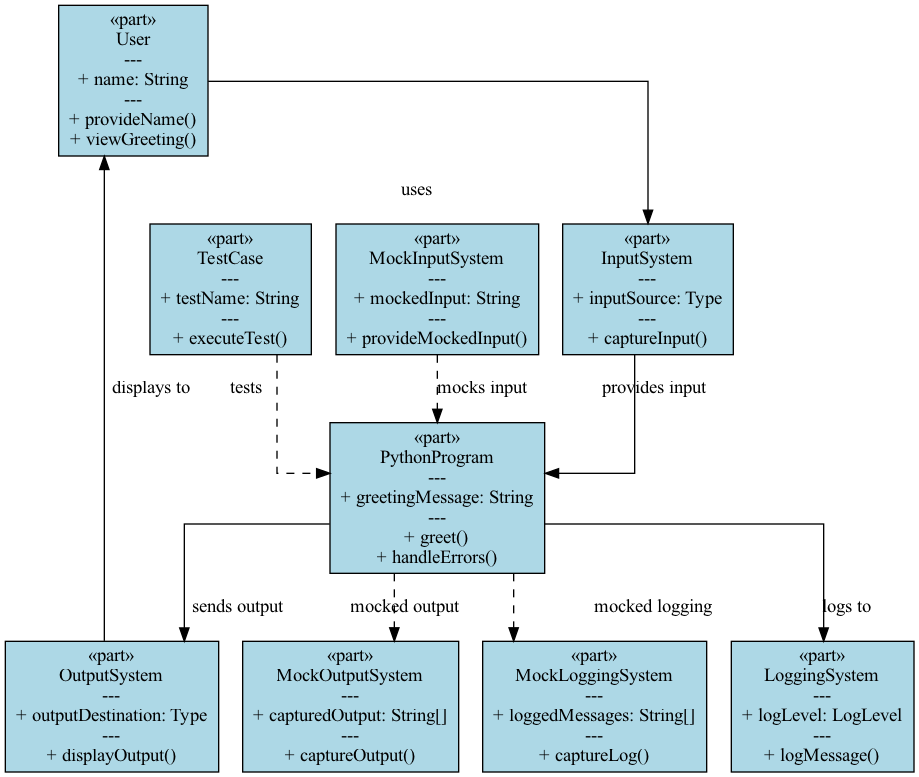
We could dive further into the nature of the OutputSystem and the InputSystem and the various variabilities and variants.
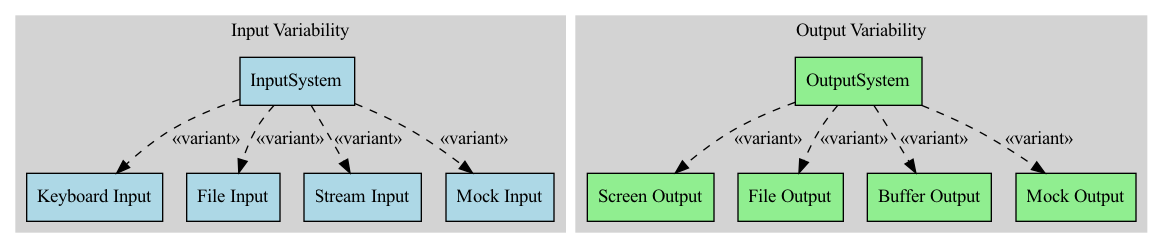
But let's leave it at that for now and take this up further in a later post when we dive all the way into SysML v2.
Wrapping it up, there are quite a few things to consider for such a simple program as:
def greet(hello):
    name = input("Please enter your name: ")
    print(f"{hello} {name}!")
    return True
Much of what we have dealt with here is as applicable to larger systems as it is to this tiny system.
© Bruce Trask 2025